Choose Kotlin (native Android) when your app is Android-first, depends heavily on device features, or needs to feel exactly like a platform app for years. Choose Flutter when you need Android and iOS from one team and one codebase, and you want a custom, brand-led interface that looks the same everywhere. For most Android-only products we recommend Kotlin with Jetpack Compose; for products that must launch on both platforms quickly with a small team, Flutter is a strong, honest choice. The right answer depends on your platforms, your features and your team, and the rest of this guide shows how to decide.
One disclosure up front: we build Android apps natively in Kotlin, so we have a preference. We have tried to be fair to Flutter, and we point out where it is the better pick.
What is Kotlin?
Kotlin is a modern, statically typed programming language that runs on the JVM. Google's Android developer documentation describes it as expressive and concise, with null safety built into the type system, and states that Android apps that use Kotlin are 20 percent less likely to crash. Android Studio provides first-class support for it, and Jetpack Compose, Android's recommended modern toolkit for building native UI, uses Kotlin APIs.
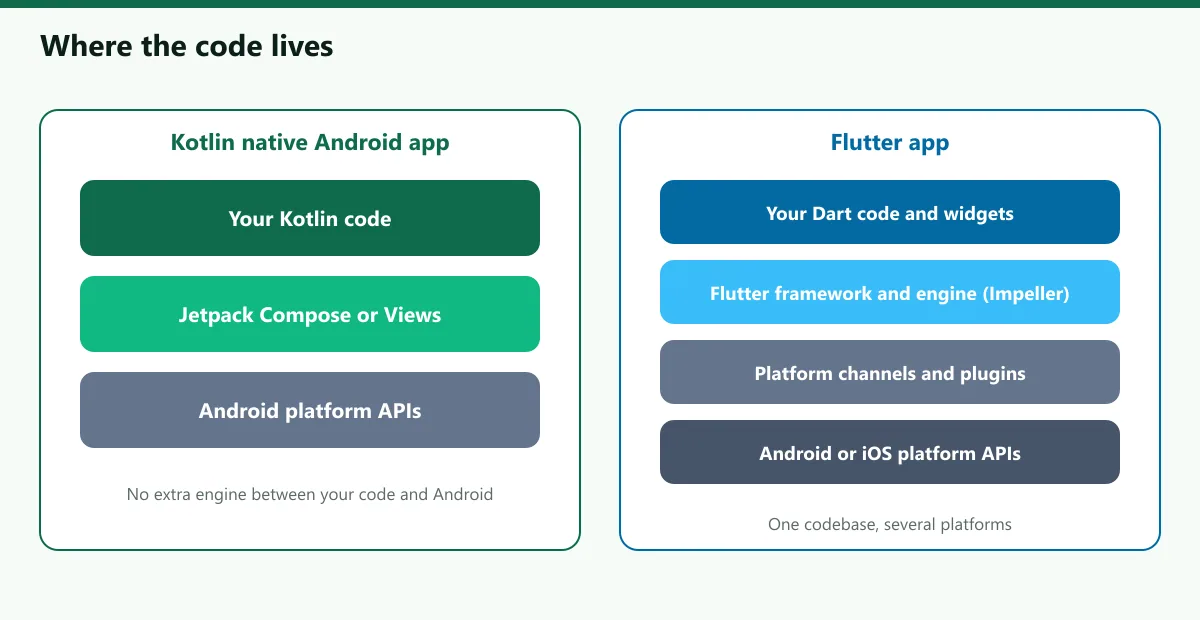
"Kotlin" in this comparison means a native Android app: Kotlin code, Jetpack Compose or Views for the interface, and direct use of Android APIs. It produces an Android app only. If you also need iOS you build a separate iOS app, or share logic with Kotlin Multiplatform (KMP), which we cover below.
What is Flutter?
Flutter is an open-source framework from Google for building natively compiled, multi-platform applications from a single codebase. You write the app in the Dart language and use Flutter's own widgets, which Flutter draws itself rather than using the platform's built-in controls. Flutter targets Android, iOS, web, desktop and embedded devices. Release builds are compiled to platform-specific binaries, and Flutter renders using its Impeller engine, which is the default rendering engine on iOS and on Android API 29 and above as of Flutter 3.27, according to Flutter's documentation.
Two features explain much of Flutter's appeal: stateful hot reload, which shows code changes almost instantly without losing state, and pixel-level control, which makes a custom design look identical on every device.
Kotlin vs Flutter: side by side
| Factor | Kotlin (native Android) | Flutter |
|---|---|---|
| Platforms from one codebase | Android only (KMP can share logic with iOS) | Android, iOS, web, desktop, embedded |
| Language | Kotlin | Dart |
| UI | Jetpack Compose or Views, using platform components | Flutter's own widgets, drawn by its engine |
| Look and feel | Matches Android and each new release automatically | Custom and consistent; platform behaviours must be matched deliberately |
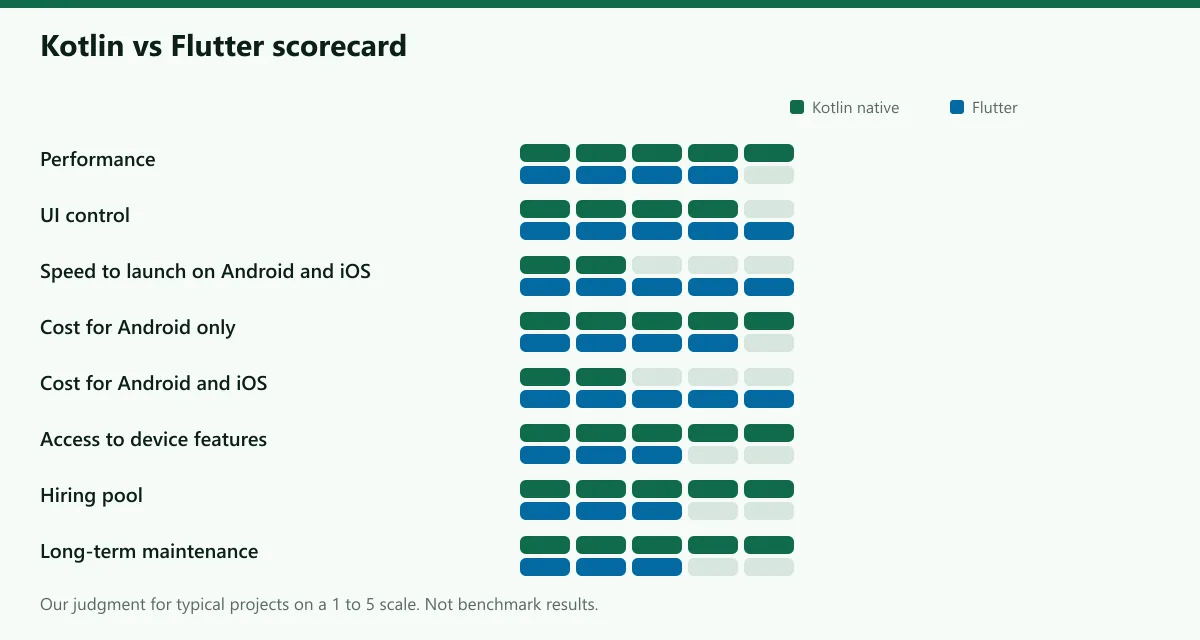
| Performance | Direct platform access, lowest overhead | Good for typical apps; compiled to native code |
| Development speed (Android only) | Fast with Compose and Android Studio | Fast with hot reload |
| Development speed (Android + iOS) | Two apps, or KMP for shared logic | One app for both, usually faster to launch |
| Cost (Android only) | Usually equal to Flutter or lower | Similar |
| Cost (Android + iOS) | Higher with two native apps | Often lower with one codebase |
| Access to device features | Immediate, including new Android APIs | Through plugins and platform channels |
| Ecosystem | Android libraries, Jetpack, Maven | Pub.dev packages |
| Hiring | Large pool of Android developers | Growing pool of Flutter developers |
| Long-term maintenance | Follows Android directly | Depends on Flutter and its plugins keeping pace |
Performance
For most apps, both are fast enough that users cannot tell the difference. Flutter compiles release builds to native code and draws its own interface using Impeller. Native Kotlin uses the platform's own rendering and has no extra layer between your code and Android.
The differences show up in particular situations:
- Heavy platform integration. Camera pipelines, sensors, Bluetooth, background services, widgets on the home screen and system integrations are Android features. In Kotlin you call them directly. In Flutter you use a plugin, or you write platform-specific code and talk to it through platform channels.
- Very large or unusual UI. Flutter handles custom animation well. Native Compose does too. Neither has a decisive edge for ordinary screens.
We do not quote benchmark figures because results depend on the app and the device. If performance is critical, build a prototype of your hardest screen in each and measure on a low-end phone.
UI and design
Flutter gives you total control: a design you create looks the same on every device and every platform, because Flutter draws every pixel. This is excellent for a strongly branded product. The trade-off is that platform conventions and new system features do not appear automatically; you must implement them.
Native Android gives you platform components and behaviour for free: system gestures, accessibility, dynamic colour and edge-to-edge rendering follow Android as it evolves. Jetpack Compose also makes custom designs straightforward, so native does not mean plain.
Development speed and cost
If you only need Android, development speed is similar. Both have strong tooling and fast iteration. The cost difference is small, and a team that is expert in one will beat a team learning the other.
If you need both Android and iOS, a single Flutter codebase can cut the effort versus two native apps, because most of the UI and logic is shared. Our Android app cost guide explains how scope and team rates drive the total, and the app cost calculator gives you a range for your features.
What about Kotlin Multiplatform?
A third option is Kotlin Multiplatform (KMP), built by JetBrains. It lets you share Kotlin code between Android, iOS and other platforms, and you choose how much to share: only business logic, or logic and UI. Kotlin Multiplatform became stable in November 2023, and at Google I/O 2024 Google announced support for using it to share business logic between Android and iOS. Compose Multiplatform extends Compose to share UI, and JetBrains' documentation lists it as stable on iOS, Android and desktop, with web in beta.
KMP suits teams that want fully native UIs on each platform with shared networking, data and rules, and teams that already have Kotlin skills. Flutter shares everything, including UI, by design; KMP lets you share only as much as you want.
Hiring and long-term maintenance
- Hiring. Android and Kotlin developers are common, and so are the libraries and documentation. Flutter has a large and active community and its own package ecosystem, but the pool of experienced developers is smaller in many markets. Check your local market before you decide.
- Maintenance. Native apps follow Android directly. Every year Google Play raises the target API level, which for new apps and updates means Android 16 (API level 36) from August 31, 2026, and a native codebase makes that migration direct. Flutter apps depend on both Flutter and their plugins keeping pace with Android and iOS. That is usually manageable, but budget for plugin updates and occasional breaking changes.
- Team skills. The best technology is the one your team can maintain for five years.
Device features and platform access
If your app depends on Android-specific features, native has the edge. Examples are home screen widgets, background processing, foreground services, deep system integration, Wear OS or Android Auto. Flutter can reach these through plugins and platform channels, and it supports adding Flutter to an existing native app. But every bridge is code you maintain.
For example, the form coach in our Maya Yoga app runs on-device with Google ML Kit and never uploads video, according to its privacy policy. That kind of camera and on-device machine learning work is straightforward in native Android, and it is the type of feature where we prefer native.
When to choose Kotlin
- Your app is Android-first or Android-only, now and for the foreseeable future.
- It uses device features heavily: camera, sensors, Bluetooth, background work, widgets or system integrations.
- You want the platform's look, behaviour and accessibility without reimplementing them.
- You expect a long life and want the easiest path through yearly Android changes.
- You already have Android developers, or you are hiring from a local Android pool.
When to choose Flutter
- You need Android and iOS together with one small team and a tight budget.
- You want a custom, branded design that looks identical on both platforms.
- Your app is mostly screens, forms and content, with light use of device features.
- You are building an MVP to validate an idea on both platforms before investing further.
- You or your team already know Dart and Flutter.
Real scenarios
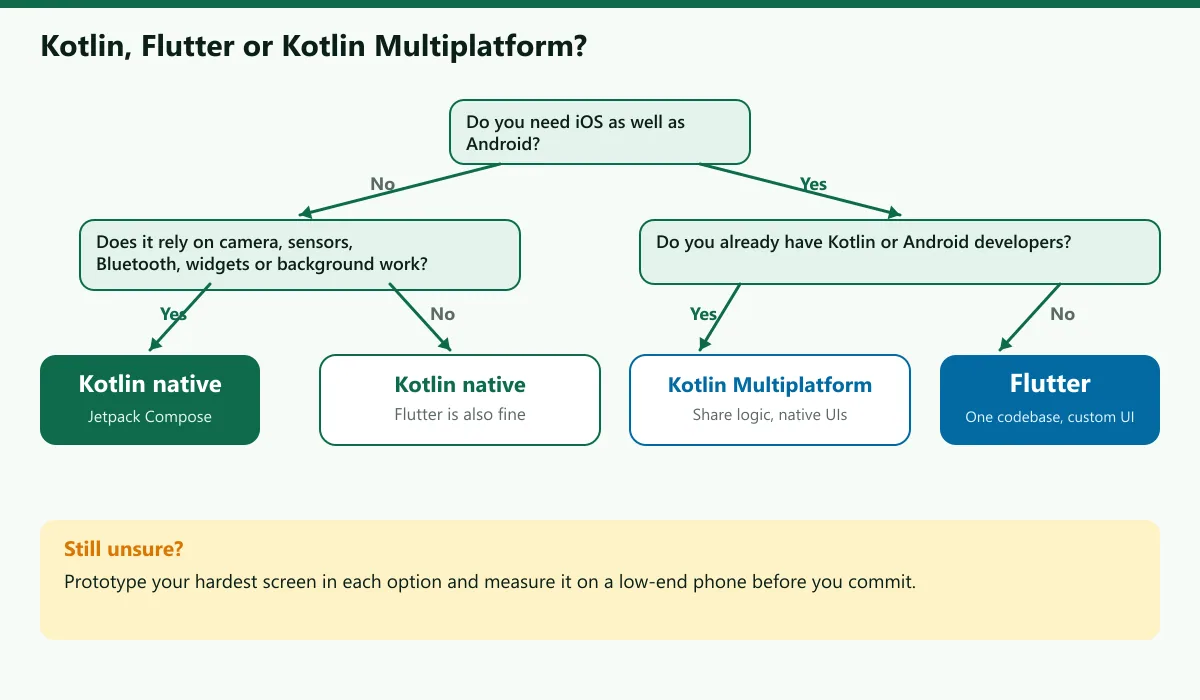
- A clinic booking app for Android patients. Mostly forms, lists and notifications, with a web admin panel. Android-only for now. Kotlin is a clean fit; Flutter would also work, and the deciding factor is future iOS plans.
- A fitness app with camera-based form feedback. On-device camera and machine learning, background reminders, home screen widgets. Kotlin, because device access is the core of the product.
- A startup MVP for a marketplace on both stores. Brand-heavy UI, standard features, one small team and a short runway. Flutter, to launch both platforms from one codebase.
- An existing Android app that now needs iOS. Logic is written in Kotlin already. Kotlin Multiplatform to share it, with native UIs, or Flutter if you want a clean break and a shared UI.
- A quiz or learning app for one market. Content-driven with offline mode and ads. Either works; we choose Kotlin when it is Android-first.
Our recommendation by project type
| Project | Our recommendation |
|---|---|
| Android-only product, long life | Kotlin with Jetpack Compose |
| Heavy device features or Android-specific integrations | Kotlin |
| Android and iOS MVP, small team | Flutter |
| Existing Kotlin team adding iOS | Kotlin Multiplatform, or Flutter for a shared UI |
| Brand-led UI that must be identical on both platforms | Flutter |
| Unsure | Prototype the hardest screen in each and measure |
If you tell us your platforms, features and timeline, we will say which we would pick for your app and why, even when the answer is not Kotlin. You can start with a short conversation on our Android development service page, or get a range from the app cost calculator. For the older Kotlin-versus-Java question, read Kotlin or Java: how we pick the language.
Frequently asked questions
Sources
- Android Developers, Kotlin on Android
- Android Developers, Jetpack Compose
- Flutter, Build apps for any screen
- Flutter documentation, Impeller rendering engine
- Flutter documentation, Writing custom platform-specific code (platform channels)
- Flutter documentation, Add Flutter to an existing app
- Kotlin documentation, Kotlin Multiplatform and Flutter: cross-platform development solutions
- Google Play Console Help, Target API level requirements

Written by
Hamza Fazal
CTO, DEESU
Muhammad Hamza Fazal is the CTO of DEESU. An Android and full-stack web developer and digital marketer based in Islamabad, he builds the apps and platforms behind DEESU's engineering work.
More from HamzaFree tools for this topic
Need help with this?