
For nearly seven years, Tailwind CSS operated as a JavaScript PostCSS plugin configured through a sprawling tailwind.config.js file. While that architecture scaled impressively across millions of repositories, large monorepos and enterprise design systems eventually ran into hard ceilings: sluggish 800-millisecond HMR rebuilds on save, fragile content glob patterns that silently purged utilities in shared workspace packages, and painful synchronization between JavaScript theme tokens and runtime CSS custom properties.
With Tailwind CSS v4, the framework was re-architected from the ground up around two core shifts: a Rust-powered compiler engine (Oxide) tightly integrated with Lightning CSS, and a CSS-first configuration model built natively on modern CSS standards (@layer, @property, color-mix(), oklch(), and @container). Instead of fighting the CSS cascade with JavaScript build hooks, Tailwind v4 becomes a thin, ultra-fast compiler layered directly over native browser capabilities.
In this engineering migration guide, we look under the hood of the Oxide engine, walk through converting tailwind.config.js to CSS-first @theme tokens, examine the OKLCH wide-gamut color upgrade, highlight subtle breaking changes that trip up production migrations, and provide a safe rollout plan for existing v3 codebases. Whenever you need to translate legacy stylesheets or design-system snippets into v4 classes during migration, open our CSS to Tailwind v4 Converter.
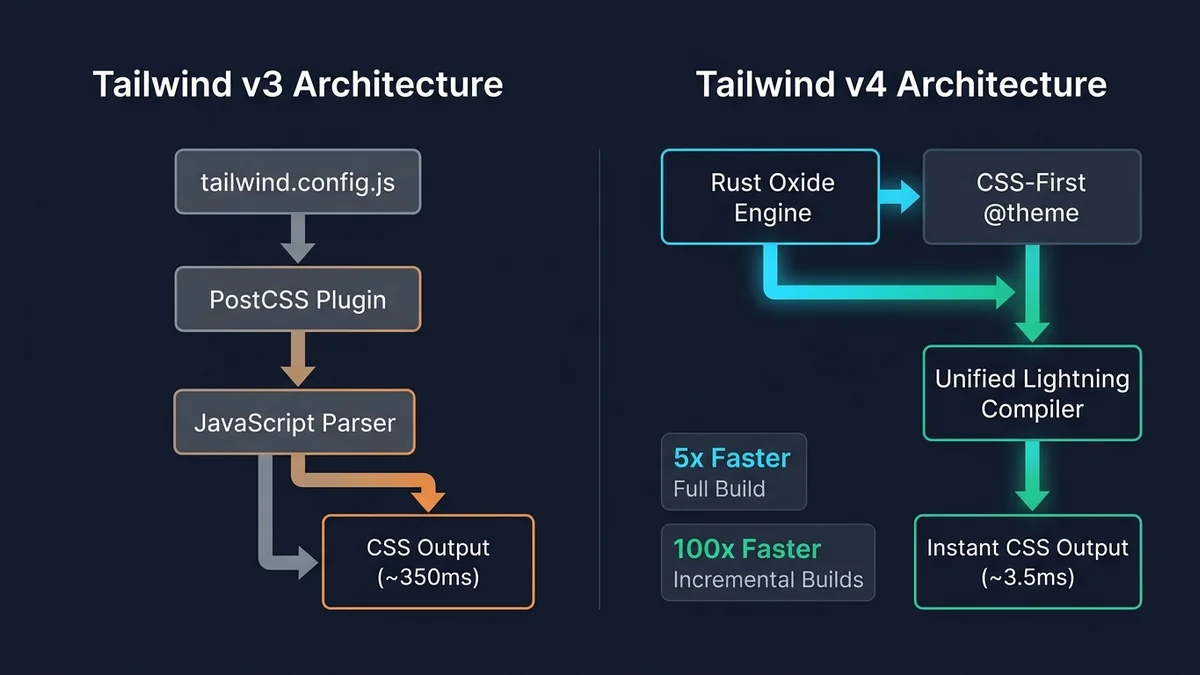
1. Inside the Oxide Engine and Lightning CSS Pipeline
In Tailwind v3, every edit to a React or Vue component triggered a multi-stage JavaScript pipeline: PostCSS parsed your stylesheets into a JS AST, Tailwind walked glob-matched files using Node.js regexes, postcss-import resolved @import statements, postcss-nesting flattened nested selectors, and autoprefixer added vendor prefixes before minification. Even with JIT mode, large multi-app workspaces routinely paid 250 ms to 1,200 ms per incremental edit.
Tailwind v4's Oxide engine rewrites the hot-path candidate scanner and file-system walker in Rust with zero-copy byte scanning and parallel directory traversal, while handing CSS parsing, nesting, @import bundling, vendor prefixing, and syntax lowering directly to Lightning CSS (also written in Rust). On real-world production apps with thousands of components, full cold builds drop by 3.5x to 5x, incremental builds with new utilities finish in single-digit milliseconds, and incremental saves that reuse existing classes compile in under 100 microseconds—making stylesheet compilation effectively imperceptible during HMR.
2. CSS-First Configuration: Replacing `tailwind.config.js` with `@theme`
The most visible developer-experience change in Tailwind v4 is deleting tailwind.config.js, postcss.config.js boilerplate, and the three legacy @tailwind base; @tailwind components; @tailwind utilities; directives. You replace all of them with a single line—@import "tailwindcss";—and declare design tokens directly inside a native CSS `@theme` block.
Why is @theme architecturally superior to a JavaScript config object? Every variable you declare inside @theme does double duty: it instructs Tailwind to generate corresponding utility classes (bg-brand-600, font-display, animate-fade-in) and emits a standard :root CSS custom property (--color-brand-600, --font-display) into your final stylesheet. That means third-party charting libraries, Motion/GSAP animations, inline styles, and custom inline SVG components—which you can clean up and turn into typed React components with our SVG Optimizer & React Converter—can consume the exact same design tokens at runtime without duplicating values in TypeScript.
@import "tailwindcss";

/* Optional: scan a shared UI package outside the default git-tracked root */
@source "../../packages/design-system/src";

/* Define design tokens directly in CSS — generates utilities AND :root CSS variables */
@theme {
  --font-sans: "Inter Variable", ui-sans-serif, system-ui, sans-serif;
  --font-mono: "JetBrains Mono", ui-monospace, monospace;

  /* Wide-gamut OKLCH brand ramp with perceptually uniform lightness steps */
  --color-brand-50:  oklch(0.97 0.015 255);
  --color-brand-500: oklch(0.61 0.215 255);
  --color-brand-600: oklch(0.53 0.225 255);
  --color-brand-950: oklch(0.24 0.085 255);

  /* Custom container query breakpoint & animation */
  --container-card: 28rem;
  --ease-snappy: cubic-bezier(0.2, 0.8, 0.2, 1);
}

/* Native CSS @layer replaces legacy plugin addUtilities/addComponents boilerplate */
@utility scrollbar-hidden {
  scrollbar-width: none;
  &::-webkit-scrollbar {
    display: none;
  }
}3. Wide-Gamut OKLCH Colors and Automatic Content Detection
Tailwind v4 upgrades its entire built-in color palette from sRGB hex codes to `oklch()`. Unlike HSL—where hsl(60, 100%, 50%) yellow looks blindingly bright while hsl(240, 100%, 50%) blue looks dark despite having the exact same 50% lightness parameter—OKLCH is perceptually uniform. Two colors with the same L (lightness) value in OKLCH exhibit nearly identical perceived brightness to the human eye, which drastically simplifies maintaining WCAG 2.2 AA/AAA contrast ratios across semantic themes, badges, and dark-mode surfaces. On modern Display P3 screens (MacBooks, iPhones, and flagship Android OLEDs), OKLCH also unlocks noticeably richer cyans, greens, and purples while Lightning CSS automatically provides safe fallbacks for older browsers.
Equally liberating is automatic content detection. Oxide automatically discovers template files across your repository while ignoring everything listed in .gitignore, binary files, images, lockfiles, and node_modules. You no longer lose an hour debugging why bg-emerald-500 disappeared in production because someone added a new /features/ folder that wasn't listed in tailwind.config.js. Whenever you legitimately need Tailwind to scan a compiled UI package inside node_modules, one explicit @source "../node_modules/@acme/ui"; directive handles it deterministically.
4. Native `@layer`, First-Class `@container` Queries, and 3D Transforms
Because Tailwind v4 targets modern baseline browsers (Chrome 111+, Safari 16.4+, Firefox 128+), it ships major layout capabilities out of the box that previously required separate npm plugins:
- True CSS Cascade Layers (`@layer theme, base, components, utilities`): Styles are wrapped in native browser
@layerblocks instead of relying purely on source order. This guarantees that unlayered reset quirks never silently override utilities—and conversely, warns you to wrap custom global resets inside@layer base { ... }so they do not overpower Tailwind utilities likep-4orm-0. - Built-in Container Queries (`@container`, `@sm:`, `@lg:`, `@max-md:`): Component libraries no longer need
@tailwindcss/container-queries. Mark any parent wrapper with@container(or named@container/sidebar) and adapt child grids based on the *component's* width rather than the global viewport. - Dynamic spacing & data-attribute scaling without config boilerplate: Utilities like
grid-cols-15,w-17,mt-29, anddata-active:bg-brand-600work dynamically without pre-registering every number or attribute in configuration—because spacing derives cleanly from a single--spacing: 0.25remmultiplier. - Native 3D transforms & radial/conic gradients: Classes such as
perspective-distant,rotate-x-12,translate-z-8,transform-3d, andbg-radialwork natively without writing custom CSS.
| Capability | Tailwind CSS v3 | Tailwind CSS v4 (Oxide) | Engineering Impact |
|---|---|---|---|
| Compiler & Bundler | JavaScript PostCSS + Autoprefixer | Rust Oxide scanner + Lightning CSS | 3.5x–5x faster cold builds; ~100x faster HMR |
| Configuration Format | tailwind.config.js / .ts (JS object) | CSS-first @import + @theme block | Zero JS/CSS token duplication; native CSS vars |
| Content Scanning | Manual content: [...] glob arrays | Automatic .gitignore-aware discovery + @source | Eliminates silent utility-purging bugs |
| Default Color Space | sRGB Hex (#3b82f6) | Wide-gamut oklch() with P3 vibrancy | Perceptually uniform contrast & richer hues |
| Container Queries | Requires @tailwindcss/container-queries | Built-in (@container, @md:, @max-sm:) | Fewer dependencies; cleaner reusable UI |
| Cascade Isolation | Simulated via source ordering | Native CSS @layer cascade rules | Predictable specificity; requires @layer base resets |
| Browser Baseline | Legacy Safari 14 / Chrome 88 | Safari 16.4+ / Chrome 111+ / Firefox 128+ | Stay on v3.4 if you must support older iOS 15 WebViews |
5. Step-by-Step Zero-Regression Migration Guide from v3 to v4
Tailwind Labs provides an automated codemod (npx @tailwindcss/upgrade) that handles 85% to 95% of mechanical changes—including renamed utilities (shadow-sm → shadow-xs, rounded-sm → rounded-xs, outline-none → outline-hidden, and default border color changing from gray-200 to currentColor). However, treating the codemod blindly on a multi-hundred-component codebase invites subtle visual regressions. Follow this disciplined production checklist:
- Confirm browser analytics first: verify your users are on Safari 16.4+, Chrome 111+, and Firefox 128+ (especially in embedded Android/iOS WebViews) before committing to v4.
- Run
npx @tailwindcss/upgradeon a dedicated migration branch using Node.js 20+, and inspect the generated@themeCSS diff carefully before accepting. - Audit every legacy stylesheet (
globals.css, third-party library overrides) to ensure custom element resets live inside@layer baserather than unlayered top-level CSS. - Check explicit border and ring styles across forms and cards: v4 changes bare
bordertocurrentColorand bareringfrom3px blue-500to1px currentColor—add explicitborder-neutral-200or restore the v3 default in@layer baseif needed. - Replace manual
@tailwindcss/container-queriesplugin imports with native v4@containerutilities, and declare@sourcepaths for any external workspace UI libraries outside the app root. - Run Playwright visual regression snapshots across light mode, dark mode, and key checkout/form flows to catch subtle
shadow-xs,ring, orspace-yselector adjustments before merging.
Frequently asked questions
@config "../../tailwind.config.js"; CSS directive placed inside your primary stylesheet. This escape hatch lets engineering teams adopt the Rust Oxide build and HMR speedups immediately while incrementally migrating legacy JavaScript plugins, custom theme extensions, and brand color tokens into native CSS @theme blocks over several sprints instead of forcing a risky big-bang rewrite.border class defaulted to gray-200 and a bare ring defaulted to a 3px blue-500 ring—behaviors that often surprised developers in dark mode or custom themes. Tailwind v4 aligns both utilities with standard CSS defaults: bare border now inherits currentColor and bare ring is 1px currentColor. You can either pass explicit colors (border-slate-200, ring-2 ring-brand-500) or set your preferred default border color globally inside @layer base.@import bundling, variables, and vendor prefixing natively. Running Tailwind v4 inside a Sass compilation step is officially unsupported and breaks CSS-first @theme parsing; keep Sass isolated in separate legacy .scss files if needed, and serve Tailwind v4 from a dedicated plain .css entrypoint.@layer and oklch() support.dark: variant automatically responds to the user's operating system preference via the prefers-color-scheme: dark media query. To switch to manual class-based or data-attribute theme toggling (such as next-themes or a custom theme switcher), add a single custom variant directive right below @import "tailwindcss";: @custom-variant dark (&:where(.dark, .dark *));. This works natively in CSS with zero JavaScript configuration files required.Sources

Written by
Hamza Fazal
Founder, DEESU
Muhammad Hamza Fazal is the Founder of DEESU. An Android and full-stack web developer and digital marketer based in Islamabad, he founded DEESU in May 2022 and leads its engineering operations, product strategy, and client software delivery.
More from HamzaFree tools for this topic
Need help with this?