
Kubernetes has won the container orchestration wars. From multinational financial institutions to high-growth tech startups, virtually every enterprise runs microservices on Kubernetes (EKS, GKE, AKS, or bare-metal). However, running Kubernetes in production has earned a notorious reputation among Chief Financial Officers: it is an insatiable cloud money pit.
Recent cloud spending surveys in 2026 reveal that the average engineering organization wastes 41% of its total Kubernetes compute budget. Clusters sit with half-empty EC2 worker nodes, pods request massive CPU reservations that they never actually utilize, and legacy autoscalers take 4 to 8 minutes to spin up new machines—forcing engineers to keep expensive over-provisioned nodes running 24/7 just to handle sudden traffic spikes.
Fortunately, the cloud-native ecosystem has evolved. Modern DevOps teams are retiring the legacy Kubernetes Cluster Autoscaler in favor of Karpenter (the open-source, just-in-time node provisioner) paired with KEDA (Kubernetes Event-driven Autoscaling). This modern architecture cuts monthly infrastructure bills by 35% to 50% while delivering sub-minute scale-out velocity.
In this comprehensive engineering guide, we contrast Karpenter against the legacy Cluster Autoscaler, explore automated node consolidation algorithms, configure KEDA queue-based scaling, and present a production-ready Karpenter NodePool manifest.
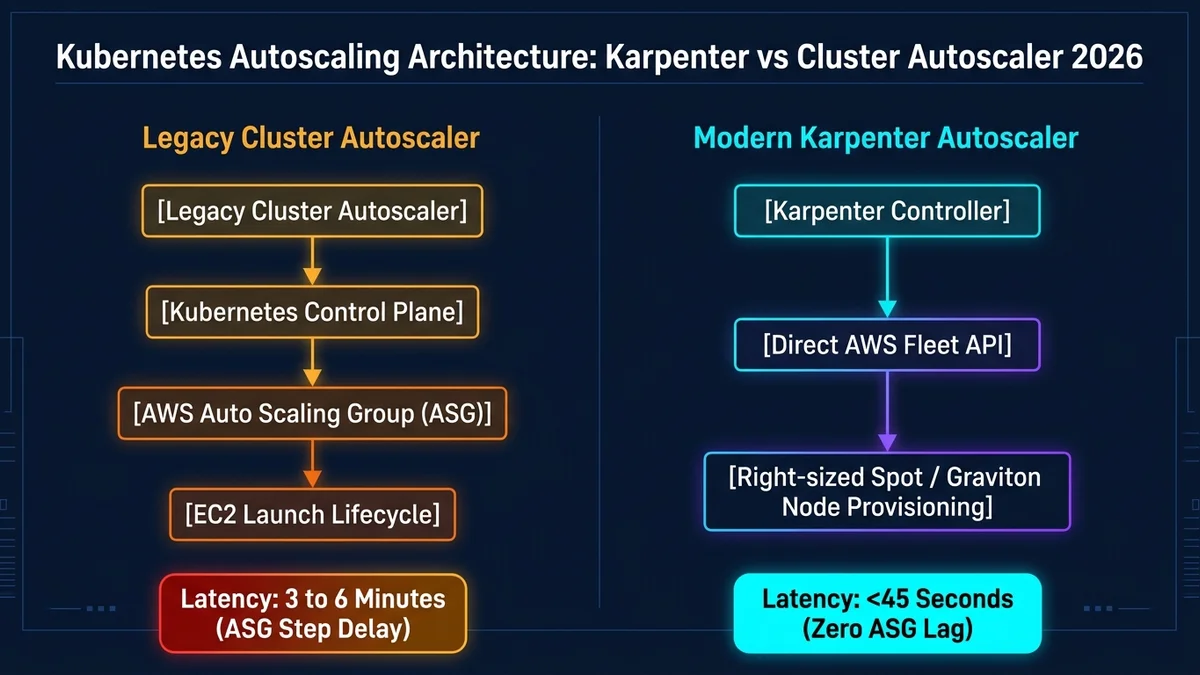
1. The Fundamental Flaws of the Legacy Cluster Autoscaler
To understand why Karpenter has become the default standard in 2026, consider how the legacy Kubernetes Cluster Autoscaler (CAS) operates. CAS was designed in the early days of Kubernetes, and its architecture is burdened with three severe structural bottlenecks:
| Architectural Factor | Legacy Cluster Autoscaler (CAS) | AWS Karpenter (Modern 2026) |
|---|---|---|
| Provisioning Speed | 3 to 6+ minutes (ASG lifecycle + EC2 init + node join). | 35 to 55 seconds (direct cloud fleet API calls). |
| Node Group Management | Requires dozens of pre-configured static ASG node groups. | Zero node groups (group-less, dynamically creates any instance type). |
| Instance Right-Sizing | Limited to the pre-configured instance size of the node group. | Bin-packs pods and selects the exact cheapest instance that fits. |
| Spot Interruption Handling | Prone to spot exhaustion; slow to re-route workloads. | Native support for spot capacity-optimized allocation. |
| Automatic De-fragmentation | Only terminates completely empty nodes. | Continuously consolidates pods to smaller, cheaper instances. |
2. How Karpenter Eliminates Node Groups and Slashes Waste
Unlike the legacy autoscaler, Karpenter does not manage AWS Auto Scaling Groups (ASGs). Instead, Karpenter runs as an in-cluster controller that directly watches the Kubernetes API for unschedulable (Pending) pods.
The moment a batch of pending pods appears, Karpenter calculates their collective CPU, memory, architecture (x86 vs ARM64 Graviton), and topology constraints. It then issues an immediate request to the cloud provider's Fleet API, requesting the single cheapest instance that perfectly accommodates those pods.
Below is a battle-tested production NodePool configuration using Karpenter v1.0+:
apiVersion: karpenter.sh/v1
kind: NodePool
metadata:
  name: default-workloads
spec:
  template:
    spec:
      requirements:
        # Allow Karpenter to select from cost-efficient ARM64 Graviton or x86
        - key: kubernetes.io/arch
          operator: In
          values: ["arm64", "amd64"]
        # Prioritize Spot instances for massive 70%+ cost savings
        - key: karpenter.sh/capacity-type
          operator: In
          values: ["spot", "on-demand"]
        # Select modern compute-optimized and general-purpose instance families
        - key: karpenter.k8s.aws/instance-category
          operator: In
          values: ["c", "m", "r"]
        - key: karpenter.k8s.aws/instance-generation
          operator: Gt
          values: ["5"]
      nodeClassRef:
        group: karpenter.k8s.aws
        kind: EC2NodeClass
        name: default
  # Enable continuous automated consolidation to minimize idle cloud spend!
  disruption:
    consolidationPolicy: WhenEmptyOrUnderutilized
    consolidateAfter: 1m
3. Automated Consolidation: The Secret to Sub-40% Bills
Notice the consolidationPolicy: WhenEmptyOrUnderutilized directive in the manifest above. This is Karpenter's killer feature.
Throughout the day, microservice traffic fluctuates. In a legacy cluster, an m5.4xlarge node might end up running only two small pods utilizing 8% of the instance's total CPU. The legacy autoscaler refuses to terminate the node because it is not 100% empty.
Karpenter actively calculates whether those two small pods could be rescheduled onto another existing node with spare capacity—or whether replacing the m5.4xlarge instance ($0.768/hr) with a tiny t4g.medium instance ($0.0336/hr) would save money. If it finds a cheaper permutation, it spins up the smaller node, gracefully drains the large instance, and terminates it within 60 seconds.
4. KEDA: Event-Driven Autoscaling Beyond CPU Spikes
While Karpenter manages the infrastructure (nodes), you still need to autoscale your application pods. The default Kubernetes Horizontal Pod Autoscaler (HPA) scales pods based on average CPU or Memory utilization.
For asynchronous background workers (e.g. video transcoders, webhook delivery bots, image processors), CPU scaling is fundamentally broken. When 50,000 webhook events flood your RabbitMQ or AWS SQS queue, worker CPU might remain at 10% because the workers haven't picked up the jobs yet! By the time CPU spikes, your latency SLAs have already breached.
KEDA (Kubernetes Event-driven Autoscaling) allows you to scale pods directly on real-time external queue metrics, and even scale down to zero pods when the queue is empty:
apiVersion: keda.sh/v1alpha1
kind: ScaledObject
metadata:
  name: queue-worker-scaler
spec:
  scaleTargetRef:
    name: webhook-worker-deployment
  minReplicaCount: 0  # Scales to ZERO when queue is empty, saving 100% compute!
  maxReplicaCount: 40
  triggers:
    - type: aws-sqs-queue
      metadata:
        queueURL: https://sqs.us-east-1.amazonaws.com/123456789/webhooks
        queueLength: "20" # Provision 1 worker pod for every 20 messages
        awsRegion: "us-east-1"
5. Combining Karpenter + KEDA for the Ultimate FinOps Stack
When Karpenter and KEDA work in tandem, a truly autonomous, self-optimizing cloud architecture emerges:
- Queue Influx (Scale Up): A sudden burst of 2,000 tasks hits your AWS SQS queue. KEDA instantly scales the deployment from 0 to 25 worker pods.
- Instant Just-In-Time Compute: The 25 pods enter Pending state. Karpenter catches the event, bypasses Auto Scaling Groups, and calls the EC2 Fleet API, provisioning two Graviton4 Spot instances in 40 seconds.
- Processing Phase: All 2,000 tasks are completed in 3 minutes with massive spot compute throughput.
- Scale to Zero & Node Deprovisioning: The SQS queue drops to 0. KEDA scales the deployment back to 0 replicas. Karpenter detects that the worker nodes are now empty and immediately terminates both EC2 instances.
- Total Cost for the Burst: Rather than running dedicated worker instances 24/7 ($250+/month), you paid only for 4 minutes of Spot compute ($0.03 total).
6. Production Kubernetes FinOps Optimization Checklist
Audit your Kubernetes cluster against this 5-point efficiency checklist today:
- Migrate from legacy Cluster Autoscaler to Karpenter to eliminate ASG scaling latency and static node groups.
- Enable Karpenter consolidation (
consolidationPolicy: WhenEmptyOrUnderutilized) to automatically defragment cluster waste. - Use KEDA to scale asynchronous worker microservices directly on message queue depths and enable scaling to zero.
- Enforce strict CPU and Memory requests/limits on all pod deployments to prevent noisy-neighbor cluster thrashing.
- Allow Karpenter to orchestrate ARM64 (AWS Graviton) instances alongside x86 to achieve 20%+ compute cost arbitrage.
Frequently asked questions
Sources

Written by
Hamza Fazal
Founder, DEESU
Muhammad Hamza Fazal is the Founder of DEESU. An Android and full-stack web developer and digital marketer based in Islamabad, he founded DEESU in May 2022 and leads its engineering operations, product strategy, and client software delivery.
More from HamzaNeed help with this?