Every engineering team starts with raw docker run commands. When prototyping a new microservice, launching a local PostgreSQL database, or testing an Nginx reverse proxy, typing docker run -d -p 8080:80 ... into your terminal provides immediate, frictionless gratification.
However, as software systems mature, those ephemeral terminal commands become a catastrophic operational liability. Ad-hoc docker run commands cannot be tracked in version control, lack declarative state, have no standardized secret management, and inevitably diverge between developer laptops, staging VMs, and production cloud nodes.
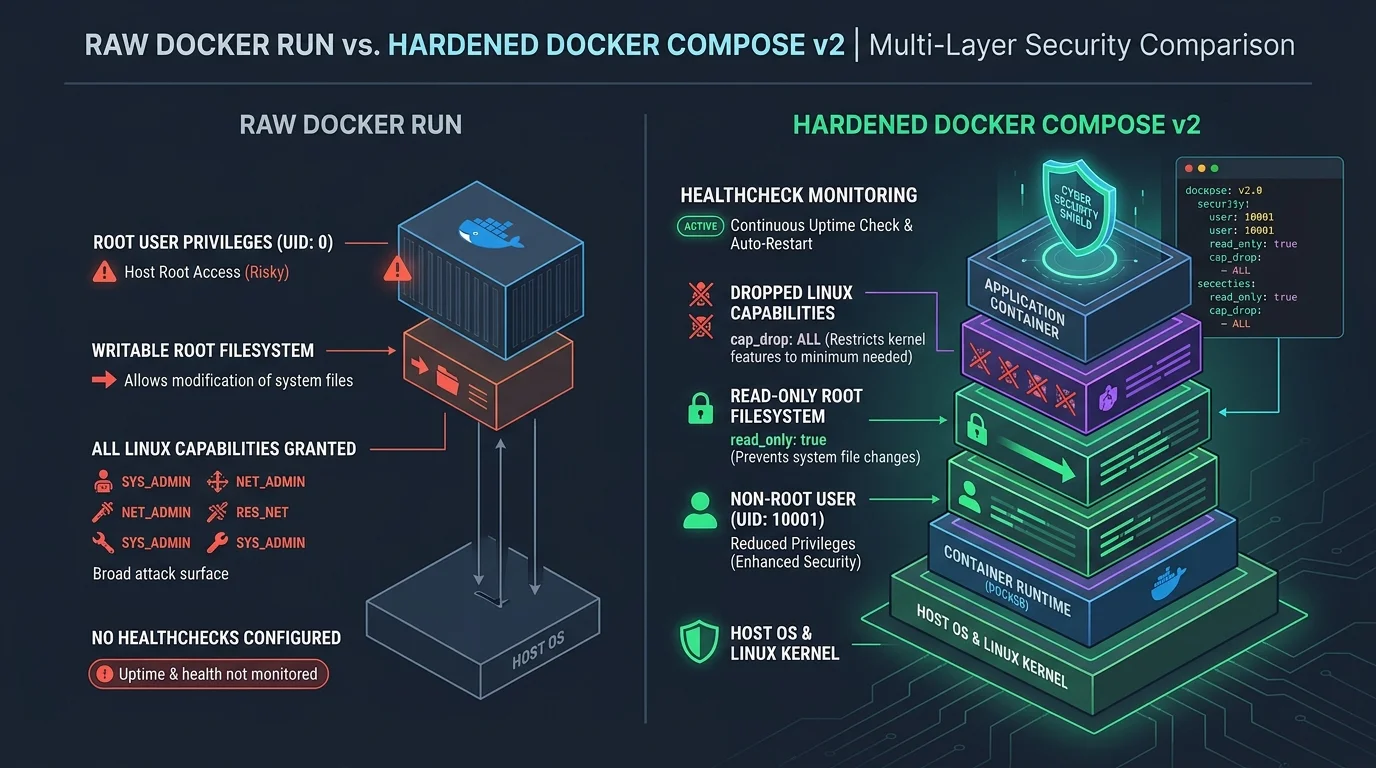
Furthermore, the default configuration of docker run is shockingly permissive. By default, Docker executes your application container as root (UID 0), grants extensive Linux kernel capabilities (including NET_RAW and SYS_CHROOT), leaves the entire root filesystem world-writable, and applies zero resource constraints on CPU or memory.
In 2026, container security audits routinely flag raw Docker deployments as high-severity risks under CIS Docker Benchmark and SOC2 compliance frameworks. If an attacker discovers a Remote Code Execution (RCE) flaw or a memory safety vulnerability inside your application, default container permissions allow them to install rootkits, tamper with shared binaries, and potentially break out directly onto the host Linux kernel.
1. The Evolution of Docker Compose v2: Dropping the Legacy Version Tag
For years, tutorials instructed developers to begin their docker-compose.yml with version: '3.8' or version: '2.4'. In modern container engineering, this pattern is completely obsolete.
Docker merged the standalone Python docker-compose binary into the native Go Docker CLI as docker compose (Compose v2). Under the open-source Compose Specification, the top-level version field has been formally deprecated. Modern Compose engines dynamically detect feature support and parse services: directly at the root of compose.yaml.
2. The 4 Essential Security Pillars of Container Hardening
When translating a docker run command into production Compose infrastructure, you must enforce defense-in-depth across four distinct security vectors:
A. Enforcing Non-Root Execution (UID 10001:10001)
Unless your application explicitly manages low-level kernel networking (e.g. WireGuard or raw packet capture), it should never run as root. Specifying a dedicated non-root user prevents an attacker who gains code execution from modifying system libraries or exploiting local kernel vulnerabilities:
# Enforce non-root execution inside container
services:
  api:
    image: node:22-alpine
    user: "10001:10001"
    security_opt:
      - no-new-privileges:true
The security_opt: - no-new-privileges:true directive is critical: it prevents binaries with setuid/setgid flags (such as /usr/bin/sudo or /bin/mount) from escalating privileges inside the container namespace.
B. Immutable Read-Only Root Filesystem with tmpfs
Enforcing read_only: true locks down the entire container root filesystem. An attacker cannot download malware via curl into /bin or overwrite your application code. For temporary runtime files (like Node PID files or cache directories), mount ephemeral, in-memory tmpfs volumes with non-executable permissions:
    read_only: true
    tmpfs:
      - /tmp:rw,noexec,nosuid,size=64m
      - /var/run:rw,noexec,nosuid,size=16m
C. Dropping All Linux Capabilities (cap_drop: [ALL])
Linux capabilities divide root privileges into distinct units. By default, Docker grants containers 14 capabilities, including CAP_CHOWN, CAP_FOWNER, CAP_NET_RAW, and CAP_MKNOD. Attackers frequently abuse NET_RAW to conduct ARP spoofing inside container networks.
The gold standard for container hardening is to drop all capabilities and explicitly whitelist only what is strictly necessary:
    cap_drop:
      - ALL
    cap_add:
      - NET_BIND_SERVICE # Only if binding to privileged ports (<1024)
D. Resource Limits (CPU & Memory Guardrails)
A single unconstrained container suffering from a memory leak or an infinite loop can trigger the Linux kernel Out-Of-Memory (OOM) killer, taking down neighboring critical databases and host services. In Docker Compose v2, specify resource limits under deploy.resources.limits:
    deploy:
      resources:
        limits:
          cpus: "1.5"
          memory: 1024M
        reservations:
          cpus: "0.25"
          memory: 256M
3. Complete Production Walkthrough: Migrating an Insecure Command
Let's examine a typical raw command copied from a blog or tutorial for a PostgreSQL 17 database:
# INSECURE: Vulnerable to host root compromise and data race conditions
docker run -d \
  --name postgres-db \
  -p 5432:5432 \
  -e POSTGRES_DB=production \
  -e POSTGRES_USER=appuser \
  -e POSTGRES_PASSWORD=supersecretpassword \
  -v pgdata:/var/lib/postgresql/data \
  postgres:17-alpine
Here is the production-grade, hardened compose.yaml translation generated with DEESU's security methodology:
services:
  postgres-db:
    image: postgres:17-alpine
    container_name: postgres-db
    restart: unless-stopped
    user: "70:70" # postgres system user in alpine
    security_opt:
      - no-new-privileges:true
    ports:
      - "127.0.0.1:5432:5432" # Bind strictly to localhost, never public 0.0.0.0
    environment:
      POSTGRES_DB: "production"
      POSTGRES_USER: "appuser"
      POSTGRES_PASSWORD_FILE: "/run/secrets/pg_password"
    secrets:
      - pg_password
    volumes:
      - pgdata:/var/lib/postgresql/data
    healthcheck:
      test: ["CMD-SHELL", "pg_isready -U appuser -d production"]
      interval: 10s
      timeout: 5s
      retries: 5
      start_period: 20s
    deploy:
      resources:
        limits:
          cpus: "2.0"
          memory: 2048M
    networks:
      - backend-network

volumes:
  pgdata:
    driver: local

secrets:
  pg_password:
    file: ./secrets/postgres_password.txt

networks:
  backend-network:
    driver: bridge
    internal: true # Isolated from public internet routing
4. Eliminating Startup Race Conditions with Healthcheck Dependencies
A frequent production disaster occurs when an API container boots up faster than its underlying PostgreSQL or Redis database. If your web service attempts to connect while PostgreSQL is still initializing shared memory, the API crashes with an uncaught ECONNREFUSED exception.
In Docker Compose v2, configure condition: service_healthy on dependent services. Docker will pause starting the API container until the database healthcheck probe passes successfully:
services:
  api:
    image: my-node-api:latest
    depends_on:
      postgres-db:
        condition: service_healthy
        restart: true
5. Rootless Docker Daemon vs Rootless User Execution
There is an essential architectural distinction between running a container process as an unprivileged user (e.g. user: '10001:10001') and running the Docker daemon itself in Rootless Mode. In standard Docker installations, the Docker daemon (dockerd) executes with full root privileges on the host system. Any user with access to the Docker socket /var/run/docker.sock effectively possesses unrestricted root access to the entire host.
In Rootless Docker mode, both the Docker daemon and container runtimes execute entirely inside a user namespace (userns). Even if an attacker uncovers an unpatched Linux kernel zero-day vulnerability and achieves a complete container breakout, the escaped process lands on the host OS as a completely unprivileged regular user, incapable of mounting disks, snooping on host memory, or altering kernel parameters.
Combining rootless daemon architecture with Compose v2 declarative configurations represents the pinnacle of modern enterprise container security, ensuring that single-container compromises never cascade into full infrastructure takeovers.
6. Summary Container Hardening Checklist
- Never publish database ports to
0.0.0.0: bind exclusively to internal networks or127.0.0.1. - Pass production secrets using Docker Secrets (
POSTGRES_PASSWORD_FILE) instead of plaintext environment variables visible indocker inspect. - Enforce
no-new-privileges: trueand execute under a non-root UID. - Set explicit CPU and memory quotas to prevent denial-of-service from resource leaks.
- Implement automated healthcheck probes to eliminate boot-time race conditions.
- Evaluate Rootless Docker daemon operation for high-exposure perimeter servers.
- Check your
compose.yamlfiles into Git repositories and deploy via automated CI/CD pipelines.
Frequently asked questions
Sources

Written by
Hamza Fazal
Founder, DEESU
Muhammad Hamza Fazal is the Founder of DEESU. An Android and full-stack web developer and digital marketer based in Islamabad, he founded DEESU in May 2022 and leads its engineering operations, product strategy, and client software delivery.
More from HamzaFree tools for this topic
Need help with this?