
Jetpack Compose has permanently transformed Android development. By replacing verbose XML layouts, imperative view hierarchies, and fragile findViewById calls with declarative Kotlin code, Compose has dramatically accelerated mobile development velocity. Google has made Compose the default standard for all modern Android applications spanning phones, tablets, foldables, and Android Auto.
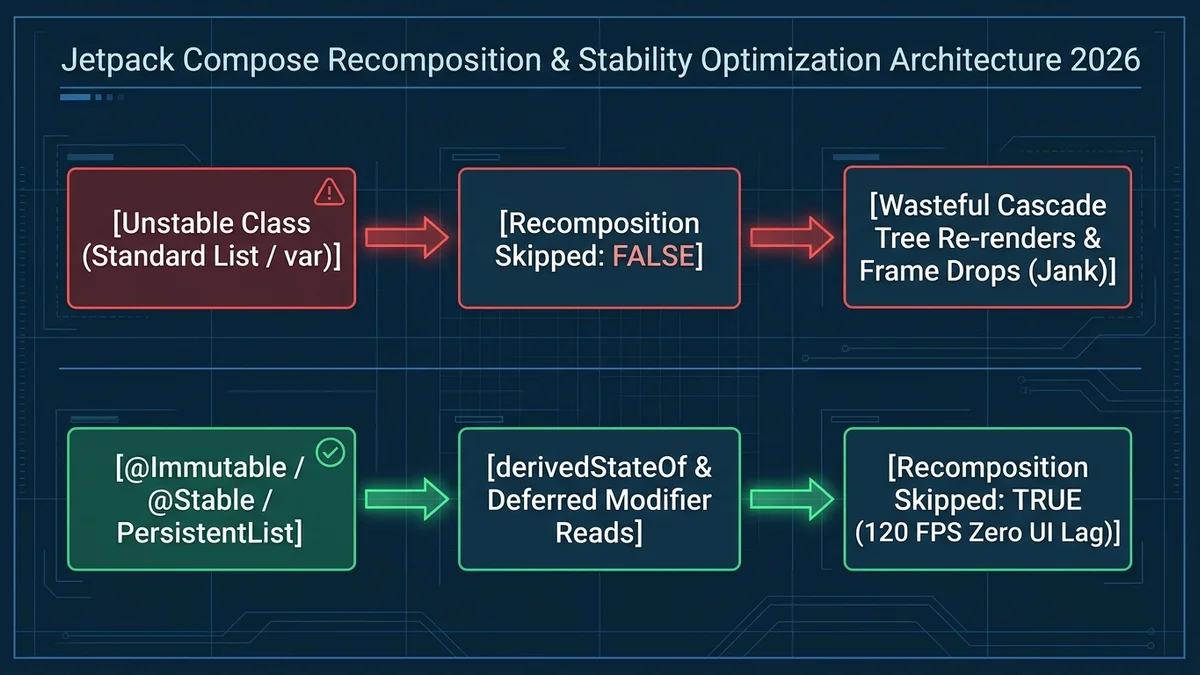
However, declarative UI introduces an entirely new class of performance bottlenecks: Unnecessary Cascade Recompositions. In traditional XML, an Android view only updated when an engineer explicitly called view.setText(). In Compose, if the runtime detects that any parameter of a @Composable function is 'unstable', it re-executes the entire function body—and every child composable below it—on every single frame.
When an application stutters during scrolling or drops frames below 60fps on modern 120Hz displays, junior engineers often blame Compose itself. In reality, 95% of Compose performance issues stem from misunderstanding the Compose Compiler Stability Algorithm and reading high-frequency state in the wrong architectural phase.
In this comprehensive engineering guide, we break down how the Compose runtime determines stability, analyze why standard Kotlin collections break skipping, demonstrate the power of derivedStateOf, and walk through automated Baseline Profile compilation for Android 16 and 17.
1. The Compose Stability Model: Stable vs. Unstable Types
During compilation, the Compose Compiler plugin inspects every parameter passed to your @Composable functions and tags it with one of three stability classifications:
| Stability Classification | Compiler Definition | Can Compose Skip Recomposition? | Examples |
|---|---|---|---|
| Immutable | All public properties are val and their types are completely immutable. | YES (Always skipped if equals returns true) | String, Int, Boolean, data class with immutable vals |
| Stable | Type is mutable, but notifies Compose runtime when mutations occur. | YES (Skipped if no notification fired) | MutableState<T>, SnapshotStateList<T> |
| Unstable | Type contains mutable properties (var) or non-guaranteed interfaces. | NO (Recomposed on every parent emission!) | Standard List<T>, Map<T, V>, classes from third-party non-Compose libraries |
2. The Hidden Trap of Standard Kotlin `List<T>`
The most common performance flaw in Android codebases involves passing a standard Kotlin List into a composable list item or card component:
// VULNERABLE: Causes endless, wasteful recompositions!
data class UserProfileUiState(
    val username: String,
    val badges: List<String> // Unstable in the eyes of the Compose compiler!
)

@Composable
fun UserBadgeRow(state: UserProfileUiState) {
    // Because badges is a List, Compose CANNOT guarantee it won't mutate.
    // Every time the parent recomposes, UserBadgeRow is FORCED to recompose,
    // even if username and badges never changed!
    Row {
        state.badges.forEach { badge ->
            Text(text = badge)
        }
    }
}
Why does the compiler treat List<String> as unstable? Because in Kotlin, List is an interface. At runtime, the underlying instance could be an instance of java.util.ArrayList (a mutable list). An external thread could modify that list without Compose ever receiving a snapshot notification.
To fix this and enable Compose to skip recomposition completely, use one of two battle-tested approaches:
// Solution A: Annotate the UI state with @Immutable
@Immutable
data class UserProfileUiState(
    val username: String,
    val badges: List<String> // Compiler now trusts this will never mutate!
)

// Solution B: Use Kotlinx Immutable Collections (Industry Standard)
import kotlinx.collections.immutable.ImmutableList

data class UserProfileUiState(
    val username: String,
    val badges: ImmutableList<String> // Strongly-typed immutable collection!
)
3. Deferred State Reading: Composition vs. Layout vs. Draw
Compose executes in three distinct sequential phases for every frame: 1. Composition (what to show) ➔ 2. Layout (where to place it) ➔ 3. Draw (how to render pixels).
When listening to rapidly changing state (such as scroll offsets, sensor inputs, or drag gestures that fire 120 times per second), reading the state during the Composition phase forces your entire UI tree to recompose 120 times every second, causing catastrophic UI jank.
Instead, defer reading the state to the Layout or Draw phase using lambda-based modifiers:
// SLOW: Recomposes the entire function 120 times/sec while scrolling!
val scrollOffset = scrollState.value
Box(
    modifier = Modifier.offset(y = scrollOffset.dp)
)

// FAST: Zero recompositions! Skips composition entirely and executes directly in the Layout phase!
Box(
    modifier = Modifier.offset {
        IntOffset(x = 0, y = scrollState.value)
    }
)
4. Preventing Over-Calculation with `derivedStateOf`
A classic pattern in mobile apps is displaying a 'Scroll to Top' floating action button only when the user has scrolled past the first 5 items in a LazyColumn. Beginners often write:
// SLOW: scrollState.firstVisibleItemIndex changes on every item scroll,
// triggering recompositions on every single item boundary!
val showScrollToTop = scrollState.firstVisibleItemIndex > 5

// FAST: derivedStateOf only emits when the boolean outcome actually flips!
val showScrollToTop by remember {
    derivedStateOf { scrollState.firstVisibleItemIndex > 5 }
}
With derivedStateOf, scrolling between item 6 and item 100 emits zero recomposition events because the boolean outcome remains true. Your UI thread stays completely idle and responsive.
5. Automated Baseline Profiles: 40% Faster Cold Starts
In production Android applications, JIT (Just-In-Time) compilation can cause frame drops during the first few seconds after app launch as the Android runtime compiles Compose bytecode on the fly.
Baseline Profiles allow developers to record critical user journeys (such as app startup, scrolling through the home feed, and opening a detail screen) into a pre-compiled binary profile. When users download your app from Google Play, Android pre-compiles those exact code paths Ahead-of-Time (AOT), delivering 30% to 50% faster cold starts and buttery-smooth initial frame rates.
// baselineprofile/src/main/java/com/example/BaselineProfileGenerator.kt
@RunWith(AndroidJUnit4::class)
class BaselineProfileGenerator {
    @get:Rule
    val rule = BaselineProfileRule()

    @Test
    fun generateBaselineProfile() = rule.collect(
        packageName = "com.company.app",
        includeInStartupProfile = true
    ) {
        pressHome()
        startActivityAndWait()

        // Simulate core user journey for AOT compilation
        device.findObject(By.res("feed_list")).fling(Direction.DOWN)
        device.waitForIdle()
    }
}
6. LazyColumn and LazyRow: Keys and ContentType Optimization
When building complex feeds, dashboards, or transaction histories, LazyColumn and LazyRow must be properly configured to prevent severe list stutter during rapid user flings. By default, if you omit explicit item identifiers, Compose uses the positional index as the key. If an item at index 0 is inserted or removed, every subsequent item shifts down by one index, destroying cached composable slot tables and triggering a full cascade of unnecessary recompositions.
Always provide a unique, persistent key and specify contentType. Providing contentType enables the Compose runtime to reuse existing composable layout nodes across rows sharing the same structure (e.g., standard articles vs. promotional cards), completely avoiding costly node disposal and re-allocation overhead:
LazyColumn(state = listState) {
    items(
        items = feedItems,
        key = { item -> item.uniqueId },
        contentType = { item -> item.viewType }
    ) { item ->
        when (item) {
            is FeedItem.Article -> ArticleRow(article = item)
            is FeedItem.Sponsored -> SponsoredBanner(ad = item)
        }
    }
}
7. Production Jetpack Compose Performance Checklist
Audit your Android codebase against these six critical rules before every major Play Store release:
- Run Compose Compiler Metrics (
-Pplugin:androidx.compose.compiler.plugins.kotlin:reportsDestination=...) to identify all unstable classes. - Replace raw
List<T>andMap<K, V>in UI state models with@Immutableannotations or KotlinxImmutableList. - Provide explicit
keyandcontentTypelambdas inside everyLazyColumnandLazyRowto enable node reuse. - Use lambda modifiers (
Modifier.offset { ... }orModifier.graphicsLayer { ... }) for continuous animations and scroll states. - Wrap frequently calculating boolean conditions derived from
LazyListStateinremember { derivedStateOf { ... } }. - Generate and bundle an automated Baseline Profile in your release Android App Bundle (AAB).
Frequently asked questions
onClick = { doSomething(unstableObject) }), the Compose compiler cannot guarantee the lambda instance is identical across recompositions. Use method references (e.g. viewModel::onItemClick) or remember the lambda instance to preserve stability.@Immutable annotation is a strict promise to the Compose compiler that public properties will never change after instantiation. If you mutate a property inside an @Immutable class without notifying Compose, the UI will not update, causing silent visual desynchronization bugs.@Immutable guarantees that an object's properties can never change once constructed. @Stable indicates that properties might mutate, but the class guarantees that any mutation will notify the Compose snapshot system (such as properties backed by mutableStateOf), allowing Compose to observe mutations safely.Sources

Written by
Wazir Ahmed
CTO, DEESU and CEO, D.TEN
Dr. Wazir Ahmed is the CTO of DEESU and leads D.TEN, its training and education division. A training manager, educational psychologist and researcher with a Ph.D. in educational psychology, he oversees learning systems, technology architecture, and training design.
More from WazirNeed help with this?