For more than a decade, Android background execution was the Wild West. Mobile applications could spawn persistent background services, hold permanent CPU WakeLocks, schedule aggressive periodic alarms, and poll remote servers at will—all at the devastating expense of user battery life, memory headroom, and device thermal throttling.
With Android 14, 15, and the latest platform shifts in Android 16 and 17, Google has systematically closed every backdoor. Launching a Foreground Service while an app is in the background now results in an instantaneous ForegroundServiceStartNotAllowedException. Furthermore, Google Play Store automated review bots actively reject or suspend applications that request SCHEDULE_EXACT_ALARM or FOREGROUND_SERVICE without qualifying for narrow, audited exemptions.
For Android developers, engineering reliable background workflows—such as media uploading, offline database synchronization, push notification payload processing, and health tracking—demands a complete transition to WorkManager, CoroutineWorkers, and Expedited Work Requests.
In this comprehensive engineering guide, we break down Android's modern background restrictions, analyze Foreground Service Type policies, solve OEM background termination issues, and construct a robust, production-ready WorkManager architecture in Kotlin.
1. The 3 Pillars of Modern Android Background Architecture
Modern Android divides asynchronous work into three distinct operational categories based on urgency and user visibility:
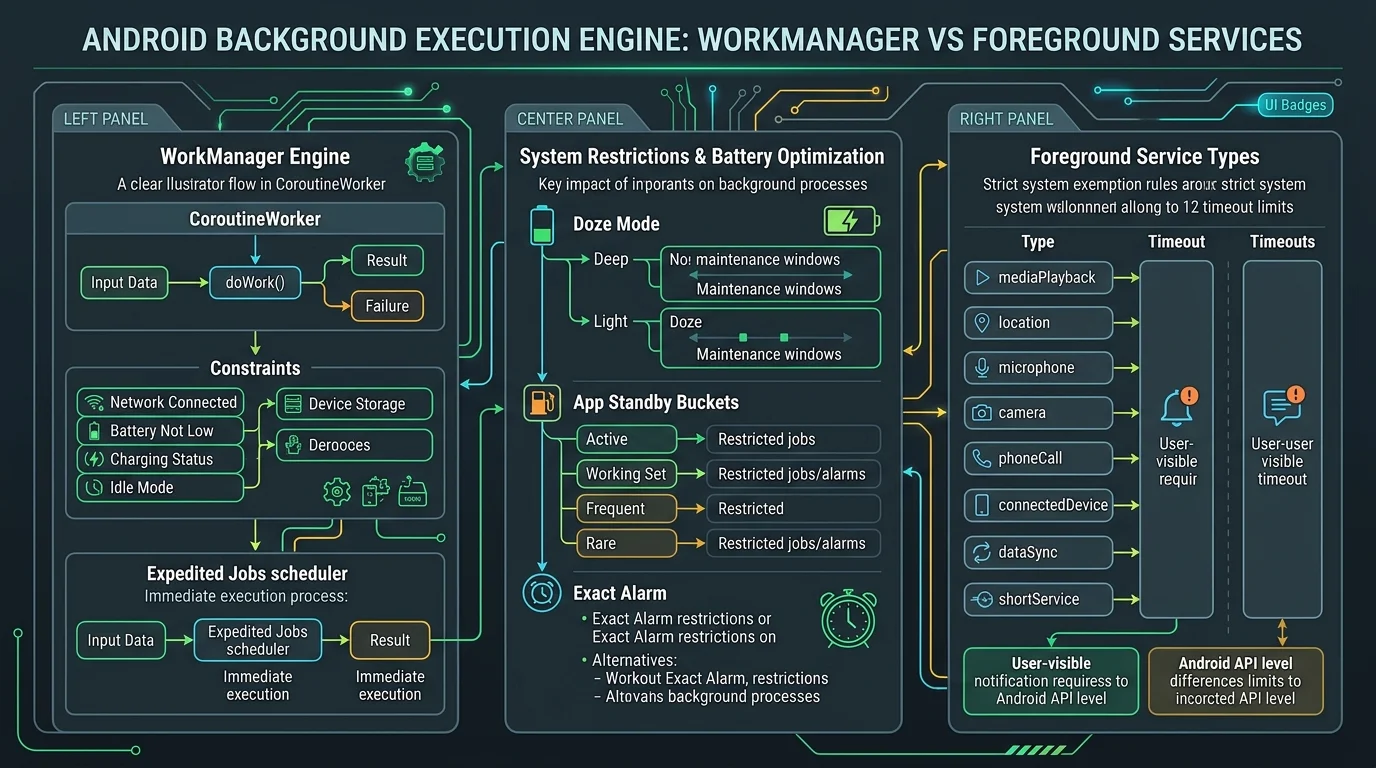
| Work Category | Recommended API | User Visibility | Survives App Kill? | Battery Impact |
|---|---|---|---|---|
| Deferrable Persistent Sync | WorkManager (OneTime / Periodic) | None (Silent in background) | Yes (Persisted in SQLite) | Extremely Low (Batched in Doze maintenance) |
| Time-Sensitive Critical Task | WorkManager Expedited Request | Optional (System notification) | Yes (High priority queue) | Low (Guaranteed execution window) |
| User-Initiated Active Task | Foreground Service (with Type) | Mandatory (Ongoing Notification) | No (Terminates if dismissed) | High (Keeps CPU awake) |
2. The Demise of Exact Alarms and Legacy Services
Historically, developers used AlarmManager.setExactAndAllowWhileIdle() to run background code at precise intervals. Under Google Play's 2026 policy guidelines, the SCHEDULE_EXACT_ALARM permission is denied by default for all apps except calendar, clock, and medication reminder apps.
If your app is not an alarm clock, Google Play review algorithms will reject your bundle. For any task that can tolerate a few minutes of scheduling flexibility, WorkManager is mandatory.
3. Surviving Aggressive OEM Battery Killers (Samsung, Xiaomi, Huawei)
One of the greatest headaches for mobile engineers is manufacturer-specific battery management software. Devices from Samsung (OneUI), Xiaomi (HyperOS / MIUI), OnePlus (OxygenOS), and Huawei implement aggressive out-of-spec power management daemons that terminate background threads the moment a user locks their screen or swipes an app from the Recents tray.
If your app relied on raw Java threads, Coroutine Scopes bound to view models, or standard services, these OEM daemons kill the process without warning. However, OEM battery optimizations are legally required by Android Compatibility Definition Documents (CDD) to honor official Android Jetpack WorkManager JobScheduler registrations.
Because WorkManager delegates scheduling to the underlying Linux alarm driver and Android JobScheduler system daemon, OEM tasks are queued and executed cleanly whenever the OEM power manager awakens the device, guaranteeing that your database sync operations are never silently discarded.
4. Production Implementation: Hardened Kotlin CoroutineWorker
WorkManager's CoroutineWorker provides native integration with Kotlin Coroutines, automatic retry backoffs, constraint validation (e.g. executing only when connected to unmetered Wi-Fi and charging), and SQLite-backed lifecycle persistence.
Here is an enterprise-grade sync worker implementing exponential backoff, progress reporting, and cancellation handling:
package org.deesu.sync.worker

import android.content.Context
import androidx.work.CoroutineWorker
import androidx.work.WorkerParameters
import androidx.work.workDataOf
import kotlinx.coroutines.Dispatchers
import kotlinx.coroutines.withContext
import java.io.IOException

class SecureDataSyncWorker(
    appContext: Context,
    params: WorkerParameters
) : CoroutineWorker(appContext, params) {

    override suspend fun doWork(): Result = withContext(Dispatchers.IO) {
        val syncType = inputData.getString(KEY_SYNC_TYPE) ?: "incremental"

        try {
            // Check if worker was cancelled by OS due to constraint violation (e.g. Wi-Fi lost)
            if (isStopped) {
                return@withContext Result.retry()
            }

            setProgress(workDataOf("status" to "connecting", "progress" to 10))

            // Execute network payload upload/download
            val syncSuccess = performRemoteSync(syncType)

            if (syncSuccess) {
                setProgress(workDataOf("status" to "completed", "progress" to 100))
                Result.success(workDataOf("synced_at" to System.currentTimeMillis()))
            } else {
                // Return retry with exponential backoff
                Result.retry()
            }
        } catch (e: IOException) {
            // Transient network failure: retry
            Result.retry()
        } catch (e: Exception) {
            // Permanent logic failure: do not waste user battery retrying
            Result.failure(workDataOf("error" to e.localizedMessage))
        }
    }

    private suspend fun performRemoteSync(type: String): Boolean {
        // Business logic interacting with Room DB and Retrofit/Ktor...
        return true
    }

    companion object {
        const val KEY_SYNC_TYPE = "key_sync_type"
        const val UNIQUE_WORK_NAME = "org.deesu.sync.unique_worker"
    }
}
5. Scheduling with Constraints and Expedited Execution
When dispatching your worker, attach strict hardware constraints to ensure your app does not consume cellular data or drain a dying battery. For critical actions, mark the request as setExpedited():
import androidx.work.*
import java.util.concurrent.TimeUnit

fun scheduleProductionSync(context: Context) {
    val constraints = Constraints.Builder()
        .setRequiredNetworkType(NetworkType.UNMETERED) // Wi-Fi only
        .setRequiresBatteryNotLow(true)
        .setRequiresStorageNotLow(true)
        .build()

    val syncRequest = OneTimeWorkRequestBuilder<SecureDataSyncWorker>()
        .setConstraints(constraints)
        .setExpedited(OutOfQuotaPolicy.RUN_AS_NON_EXPEDITED_WORK_REQUEST)
        .setBackoffCriteria(
            BackoffPolicy.EXPONENTIAL,
            WorkRequest.MIN_BACKOFF_MILLIS,
            TimeUnit.MILLISECONDS
        )
        .setInputData(workDataOf(SecureDataSyncWorker.KEY_SYNC_TYPE to "full"))
        .build()

    // Enqueue unique work to prevent duplicate concurrent sync jobs
    WorkManager.getInstance(context).enqueueUniqueWork(
        SecureDataSyncWorker.UNIQUE_WORK_NAME,
        ExistingWorkPolicy.KEEP,
        syncRequest
    )
}
To debug background sync issues without waiting hours for real Doze mode cycles, Android Studio provides the Background Task Inspector. Developers can inspect scheduled workers, simulate constraint violations (such as toggling Wi-Fi off or simulating battery low states), and force immediate execution with adb shell commands.
Using adb shell dumpsys activity service and adb shell cmd jobscheduler run -f, engineers can deterministically trigger expedited workers and verify that database transactions commit cleanly even when the application process has been completely killed by the Linux low-memory killer.
6. Navigating App Standby Buckets & Doze Mode
The Android operating system assigns every application to an App Standby Bucket based on user engagement frequency: *Active*, *Working Set*, *Frequent*, *Rare*, or *Restricted*. Apps in the *Rare* bucket are allowed to execute background jobs for only 10 minutes per day.
Because WorkManager automatically hooks into system alarms and JobScheduler under the hood, it aggregates work into Doze Mode maintenance windows, preserving your application's battery reputation in Android Vitals and preventing bad rating penalties in Google Play.
7. Production Android Background Checklist
- Audit AndroidManifest.xml: remove all
SCHEDULE_EXACT_ALARMdeclarations unless your app is a clock or calendar. - Declare explicit
android:foregroundServiceTypefor every Foreground Service and adhere to the 6-hour timeout. - Migrate deferrable background tasks to WorkManager
CoroutineWorkerwith network and battery constraints. - Use
enqueueUniqueWorkwithExistingWorkPolicy.KEEPorREPLACEto eliminate redundant sync operations. - Implement
setExpedited()withOutOfQuotaPolicy.RUN_AS_NON_EXPEDITED_WORK_REQUESTfor urgent tasks. - Verify worker survival against system process kills using Android Studio's Background Task Inspector.
Frequently asked questions
Sources

Written by
Wazir Ahmed
CTO, DEESU and CEO, D.TEN
Dr. Wazir Ahmed is the CTO of DEESU and leads D.TEN, its training and education division. A training manager, educational psychologist and researcher with a Ph.D. in educational psychology, he oversees learning systems, technology architecture, and training design.
More from WazirNeed help with this?