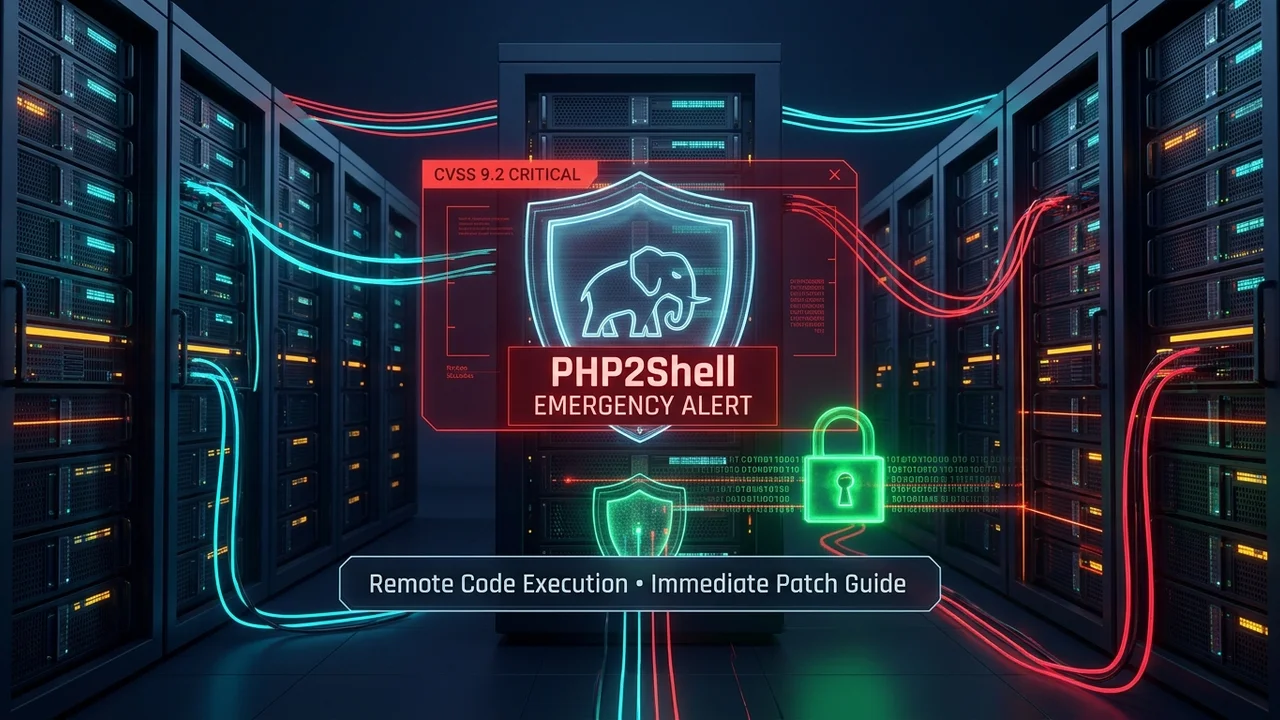
On October 21, 2026, the global web development community received an urgent alert: the PHP core security team released emergency security updates addressing two critical vulnerabilities collectively nicknamed 'PHP2Shell' (tracked as CVE-2026-109618 and CVE-2026-109619).
With a maximum severity score of CVSS 9.2, PHP2Shell allows unauthenticated remote attackers to execute arbitrary code directly on vulnerable web servers by sending specially crafted HTTP headers and payloads. Because PHP powers over 75% of the web—including WordPress, Laravel, Drupal, Magento, and millions of enterprise APIs—this vulnerability represents the most dangerous web infrastructure emergency of 2026.
Active scanning and automated exploitation attempts are already being tracked in the wild across global hosting providers and cloud networks. If you operate an application powered by PHP, your server is almost certainly being probed right now.
In this comprehensive emergency guide, we break down what errors appear in server logs, explain exactly where these memory corruption flaws originate inside the Zend Engine, provide the definitive patch steps, and detail alternative mitigation solutions for teams stuck on legacy PHP versions.
What Errors Are Found? Server Log Signatures of PHP2Shell
When an attacker scans or attempts to exploit your server with a PHP2Shell payload, the memory corruption triggers abnormal worker terminations. You will not find clean PHP stack traces in your application logs; instead, you must inspect your low-level web server and daemon logs:
1. PHP-FPM Log Signatures (/var/log/php*-fpm.log)
Look for unexpected worker crashes, segmentation faults (signal 11), and heap corruption warnings:
[23-Oct-2026 04:12:08] WARNING: [pool www] child 14282 exited on signal 11 (SIGSEGV - core dumped) after 12.404281 seconds from start
[23-Oct-2026 04:12:08] NOTICE: [pool www] child 14391 started
[23-Oct-2026 04:12:09] ERROR: [pool www] failed to post process request: zend_mm_heap corrupted
[23-Oct-2026 04:12:11] WARNING: [pool www] child 14391 exited with code 139 (SIGSEGV)2. Nginx & Apache Error Logs (502 Bad Gateway)
Because the PHP worker process dies while processing the HTTP headers, the front-facing web server drops the connection, returning a 502 Bad Gateway error to the client:
2026/10/23 04:12:08 [error] 1420#1420: *89410 upstream prematurely closed connection while reading response header from upstream, client: 198.51.100.24, server: example.com, request: "POST /index.php HTTP/1.1", upstream: "fastcgi://unix:/run/php/php8.3-fpm.sock:"3. Kernel Ring Buffer & System Logs (dmesg / /var/log/messages)
On Linux hosts, kernel segfault notices record the exact instruction pointer failure inside the PHP binary:
# Run this command on your server to search for exploit attempts:
sudo dmesg -T | grep -E -i "php-fpm.*segfault|libc.*double free"

# Output indicating active exploitation or crash:
# [Fri Oct 23 04:12:08 2026] php-fpm[14282]: segfault at 7f3b890a ip 000055c1b820e410 sp 00007ffdf81a02b0 error 4 in php-fpm[55c1b8000000+18f000]
# [Fri Oct 23 04:12:09 2026] libc: *** Error in 'php-fpm: pool www': double free or corruption (out): 0x000055d28d40a120 ***Where Do These Errors Come From? The Root Cause in C
To understand why PHP2Shell is so severe, we must look into the C source code of the Zend Engine memory manager (Zend/zend_alloc.c) and request parsing routines (main/rfc1867.c).
PHP manages memory using segregated free lists and dedicated memory arenas (typically 2MB chunks) allocated per request. Here is how the two flaws chain together to achieve Remote Code Execution:
- The Trigger (CVE-2026-109618): An attacker sends an HTTP POST request containing malformed
multipart/form-dataor padded header fields configured to push PHP's memory consumption right to its configuredmemory_limit. This triggers an Out-of-Memory (OOM) error during the initialization phase of the request. - The Unclean Bailout: In normal operation, an OOM error triggers
zend_bailout(), which jumps out of execution and begins cleaning up memory. However, because the request was interrupted *halfway through initialization*, internal execution context pointers (execute_data) point to garbage or unallocated memory blocks. - Heap Arena Corruption: The cleanup function attempts to release memory blocks that were never properly registered in the Zend heap, causing a double-free condition and overwriting adjacent memory chunk descriptors.
- The Persistence Hijack (CVE-2026-109619): In long-running worker environments (
php-fpmormod_php), worker processes do not restart after every request. The corrupted worker resets its stack and immediately accepts the next incoming request from the queue. - Arbitrary Execution: The attacker sends a second request to the same worker. Because the worker's internal global pointers are corrupted, the attacker's payload controls the function call pointers, redirecting CPU execution to
/bin/shor arbitrary shellcode.
Visual Architecture Guide: Attack vs. Remediation
The diagram below illustrates the exact exploit path compared to the comprehensive remediation pipeline:
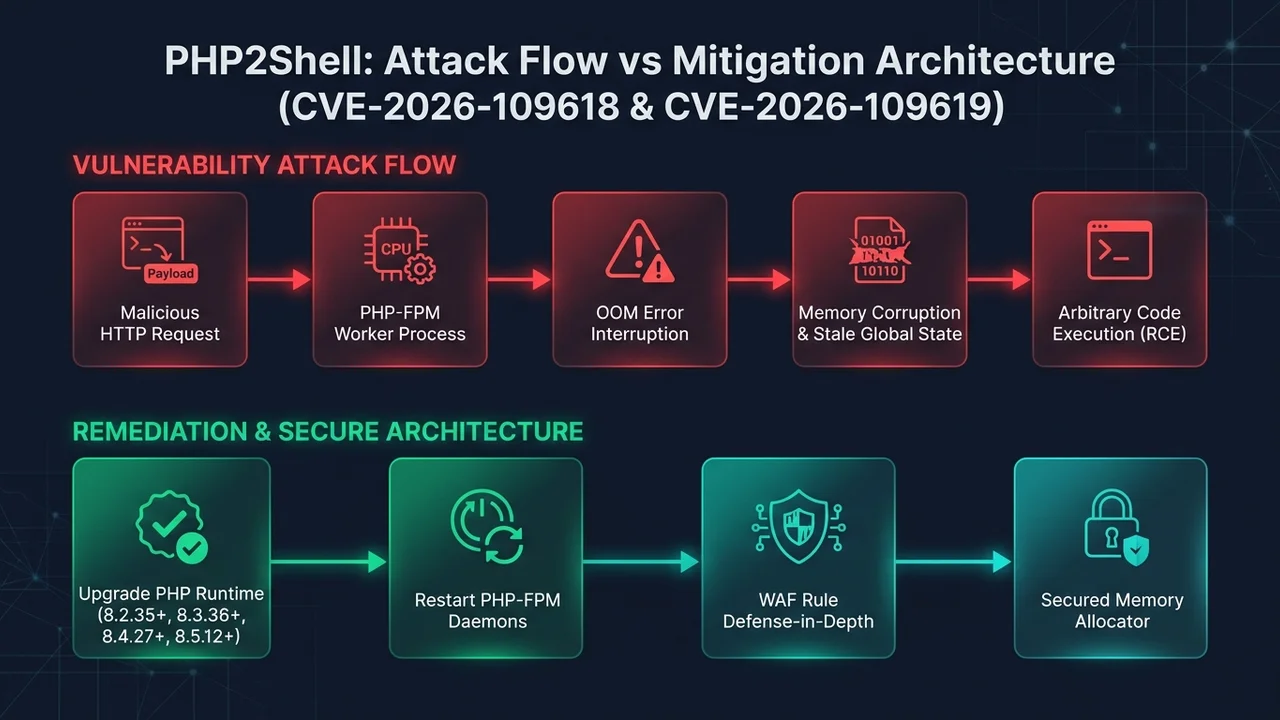
As shown in Figure 1, relying solely on package upgrades without restarting active processes leaves the top attack lane open because active workers hold the vulnerable binary in memory.
Who Is Affected? Version Matrix
The vulnerability impacts virtually all unpatched PHP versions from PHP 5.4 through modern PHP 8.5 running in web-facing environments:
| PHP Branch | Vulnerable Releases | Official Patched Version | Status |
|---|---|---|---|
| PHP 8.5 | 8.5.0 through 8.5.11 | 8.5.12+ | Active / Supported |
| PHP 8.4 | 8.4.0 through 8.4.26 | 8.4.27+ | Active / Supported |
| PHP 8.3 | 8.3.0 through 8.3.35 | 8.3.36+ | Active / Supported |
| PHP 8.2 | 8.2.0 through 8.2.34 | 8.2.35+ | Security-Fixes Only |
| PHP 8.1 & Older (7.4, 7.3, 5.6) | All versions | No Official Upstream Fix | End-of-Life (EOL) — High Risk |
The Primary Solution: Step-by-Step Emergency Patching
Remediating PHP2Shell requires updating the underlying PHP interpreter package on your operating system or container image and restarting all running worker processes. Follow the instructions for your environment below:
1. Ubuntu & Debian Servers (Nginx + PHP-FPM or Apache)
On Debian-based systems, fetch the latest package definitions from your package repository (including Ondřej Surý's PPA or official Debian security mirrors) and upgrade:
# 1. Update package lists
sudo apt update

# 2. Check installed PHP version
php -v

# 3. Upgrade PHP runtime packages
sudo apt --only-upgrade install "php*-fpm" "php*-cli" "php*-common"

# 4. CRITICAL STEP: Restart the PHP-FPM service (replace 8.3 with your active version)
sudo systemctl restart php8.3-fpm

# 5. If using Apache with mod_php, restart Apache
sudo systemctl restart apache22. RHEL, AlmaLinux & Rocky Linux (dnf / yum)
On Red Hat enterprise distributions (using Remi or EPEL repositories):
# 1. Refresh repository metadata
sudo dnf clean all && sudo dnf check-update

# 2. Upgrade PHP core packages
sudo dnf upgrade "php*"

# 3. Verify the installed version meets or exceeds the patch target
php -v

# 4. Restart the PHP-FPM daemon
sudo systemctl restart php-fpm3. Docker & Kubernetes Environments
If your application runs inside Docker containers, updating the host system does nothing. You must rebuild your container images from updated base images:
# Pull the updated official patched image (released Oct 21, 2026)
FROM php:8.3.36-fpm-alpine

# Verify inside your build pipeline
RUN php -r 'echo "PHP Version: " . PHP_VERSION . "\n";'

# Continue with your standard build...
WORKDIR /var/www/html
COPY . .Once rebuilt, trigger a rolling restart across your Kubernetes clusters (kubectl rollout restart deployment/php-app) to terminate old vulnerable pods.
The Fatal Mistake: Forgetting to Restart Worker Daemons
The number one operational mistake sysadmins make during security emergencies is running apt upgrade or dnf update and assuming the system is secure.
Linux package managers overwrite files on disk, but active processes remain running in memory. If your PHP-FPM master daemon and child workers have been running for 14 days, they will continue executing the unpatched, vulnerable binary in memory until explicitly restarted.
Verify that your running processes reflect the new binary by inspecting the /proc filesystem:
# Check if running PHP processes are holding deleted (unlinked) libraries:
lsof -n | grep -i 'php.*deleted'Alternative Solutions: What If You Cannot Upgrade Immediately?
If your organization is stuck on an End-of-Life (EOL) version (such as PHP 8.1, 8.0, 7.4, or 5.6) due to legacy code dependencies, official upstream patches do not exist. Implement these four defense-in-depth alternative mitigations immediately:
Alternative 1: Enforce Worker Isolation ('pm.max_requests = 1')
Because CVE-2026-109619 requires a worker process to persist across multiple requests to reuse corrupted state, you can eliminate cross-request exploitation by forcing PHP-FPM to kill and respawn each worker process after every single request:
; Edit your pool configuration (e.g. /etc/php/7.4/fpm/pool.d/www.conf)
; Force worker respawn after every single request
pm.max_requests = 1While this introduces a minor CPU overhead (roughly 3–7% under high load), it completely blocks the persistence chain of the exploit until you can upgrade.
Alternative 2: Reverse Proxy Request Filtering in Nginx
Block malformed headers and oversized multipart boundaries before traffic ever reaches the PHP fastcgi socket:
# /etc/nginx/conf.d/php2shell-block.conf
# Restrict request body buffer sizes and reject anomalous multipart headers
client_max_body_size 16M;
client_body_buffer_size 128k;
client_header_buffer_size 1k;
large_client_header_buffers 4 8k;

# Reject requests with abnormally long multipart boundaries
if ($http_content_type ~* "boundary=[^;]{128,}") {
    return 400 "Bad Request: Malformed multipart boundary";
}Alternative 3: Cloudflare & AWS WAF Virtual Patching
If your application sits behind a cloud edge firewall, deploy custom WAF rules to inspect HTTP request headers and body boundaries. Restrict HTTP methods to endpoints that actually accept POST data, and enable managed rule sets for PHP Remote Code Execution.
Alternative 4: Enterprise Linux Extended Lifecycle Support (ELS)
If you cannot modify application code, subscribe to Linux vendor backport channels such as Ubuntu Pro (ESM), Red Hat Enterprise Linux Extended Life Cycle Support (ELS), or CloudLinux HardenedPHP. These vendors maintain private backported security fixes for older PHP 7.4 and 8.0 packages.
Summary Checklist for Engineering Teams
To ensure your infrastructure is 100% safeguarded against PHP2Shell, complete this verification checklist:
- Audit all public-facing and internal servers to identify active PHP runtime versions.
- Check system logs for crash signatures ('SIGSEGV', 'zend_mm_heap corrupted', '502 Bad Gateway').
- Upgrade PHP binaries to 8.2.35+, 8.3.36+, 8.4.27+, or 8.5.12+ via your package manager.
- Force-restart all PHP-FPM, Apache, and LiteSpeed daemon worker processes.
- Rebuild and redeploy all Docker container images referencing official PHP base tags.
- Confirm no running processes hold deleted binary references using 'lsof -n | grep php.*deleted'.
- If running legacy EOL PHP (8.1 or older), set 'pm.max_requests = 1' and deploy Nginx buffer rules.
- Enable WAF virtual patching rules to drop malformed multipart requests as a secondary barrier.
Frequently asked questions
Sources

Written by
Hamza Fazal
Founder, DEESU
Muhammad Hamza Fazal is the Founder of DEESU. An Android and full-stack web developer and digital marketer based in Islamabad, he founded DEESU in May 2022 and leads its engineering operations, product strategy, and client software delivery.
More from HamzaNeed help with this?