If you manage an Android app on Google Play, your submission workflow in October 2026 looks fundamentally different from how it operated a year ago. What began as broad policy discussions around synthetic media and algorithmic transparency has crystallized into rigid, enforceable rules inside the Google Play Console. App developers submitting updates are now confronted with mandatory AI Asset Declarations for store graphics, strict in-app reporting obligations for any generative AI functionality, and updated Data Safety disclosures that scrutinize where user prompts and media travel.
For development teams and product founders, this is not an abstract ethics debate. App updates are actively being halted in review queues when automated classifiers detect AI-generated screenshots or synthetic marketing graphics that developers uploaded without ticking the declaration checkbox. Similarly, apps featuring conversational LLMs or AI photo enhancers are facing immediate rejections if they lack a direct, in-app offensive content flagging system. Navigating these requirements requires knowing precisely where the line falls between ordinary graphic design tools and declared generative assets, and how to configure your Play Console metadata to stay fully compliant.
The New AI Asset Declaration in Google Play Console
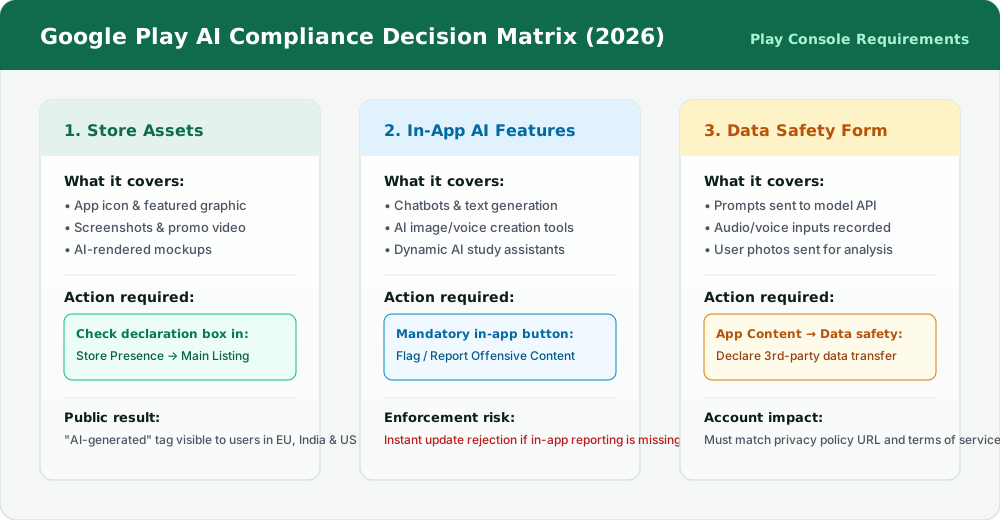
The most visible operational change for marketing and design teams is the AI Asset Declaration integrated directly into the Store Presence section of the Play Console. Google Play now requires developers to formally self-declare whether key promotional graphics were generated or substantially altered using generative artificial intelligence tools.
This declaration covers the primary visual assets that convince a user to install your software:
- App Icon (512x512): Icons generated via Midjourney, DALL-E, Flux, or Stable Diffusion, or synthesized 3D badge renders.
- Feature Graphic (1024x500): Banner artwork composed using text-to-image prompts or AI scene generation.
- Phone & Tablet Screenshots: App interface mockups featuring synthetic humans, AI-generated background scenes, or photorealistic illustrations that do not depict actual application UI.
- Promotional Videos: Linked YouTube trailers containing synthetic voices, AI avatar narrators, or generated video sequences.
Public Store Labels: Where Disclosures Appear to Users
Once an asset is declared in the Play Console, Google Play automatically attaches a public transparency tag to the listing. On the consumer-facing Play Store app and web interface, visitors in jurisdictions with strict transparency mandates see an explicit 'AI-generated' badge beside the media carousel or beneath the developer information.
This mechanism is designed to satisfy converging international regulatory pressures, most notably Article 50 of the European Union AI Act, which mandates clear labeling when synthetic visual or audio media is presented to consumers. Regional regulations in India, South Korea, and emerging state-level disclosures in the United States (such as California and New York) are similarly driving Google to make synthetic media declaration a baseline platform standard rather than an optional setting.
| Asset / Feature Type | Play Console Requirement | Public User Facing Result | Primary Regulatory Driver |
|---|---|---|---|
| AI-Generated App Icon or Feature Banner | Tick 'AI-generated asset' checkbox in Main Store Listing | Public 'AI-generated' tag displayed on listing | EU AI Act Art. 50 / Global Store Policy |
| AI-Assisted Screenshots (Retouched UI) | No declaration needed if UI reflects actual app screens | No public label applied | Standard Store Listing Guidelines |
| In-App Conversational LLM or Assistant | Provide in-app report button & content moderation | App flagged as Generative AI in App Content audit | Google Play Generative AI Policy |
| AI Avatar / Image Generation Tool | Mandatory in-app flagging + Data safety disclosures | Listed under Generative AI category | Synthetic Media & Child Safety Guardrails |
| User Prompts Transmitted to Cloud LLMs | Declare third-party data sharing in Data Safety form | Disclosed on Store Data Safety page | Google Play Privacy & User Data Policy |
In-App Generative AI Policy: The Mandatory Reporting Mechanism
The rules governing the Play Store listing itself are only half of Google's compliance framework. If your Android app includes generative AI as a functional feature — whether an embedded chatbot, an automated coding assistant, an AI story generator, or an image synthesiser — you must satisfy Google Play's In-App Generative AI Policy.
The cornerstone of this policy is an uncompromising architectural requirement: Every application containing generative AI must provide an intuitive, in-app mechanism that lets users report objectionable or offensive AI-generated content without leaving the app.
Google Play reviewers test this requirement during APK/AAB review. An app update will be rejected if reviewers generate an AI response and discover:
- There is no visible 'Flag', 'Report', or overflow menu option attached to the AI response bubble or output card.
- The report button merely links out to an external web form or mailto link rather than providing a native reporting dialog.
- The application generates unmoderated responses without guardrails against sexually explicit content, hate speech, self-harm instructions, or deceptive impersonation.
Data Safety Form: Auditing Where Prompts and Files Go
Whenever an app transmits user input to an external machine learning model, Google Play's Data Safety form must accurately disclose that transmission. Under Google's user data policies, prompts typed by users, voice notes dictated into a microphone, or photos selected from the device gallery count as personal user data.
When completing or updating your Data Safety declaration in Play Console, you must answer three critical questions regarding your AI architecture:
- Data Collection vs. Data Sharing: If user prompts are routed to your own private backend servers before calling an AI model, they are considered 'Collected'. If your app sends queries directly from the Android client to a third-party API endpoint (e.g., Anthropic, OpenAI, or an unmanaged provider), they are classified as 'Shared' with a third party.
- Ephemerality and Retention: If prompts are processed transiently in memory to generate a response and immediately discarded, you can declare them as ephemeral. However, if your AI provider or your database stores chat histories for model fine-tuning or user session persistence, you must state that data is retained.
- Account Deletion Alignment: In accordance with Google Play's account deletion policies, if you store user chat logs or AI generation history tied to user profiles, you must provide a straightforward mechanism for users to delete their stored data and account entirely.
The Biggest Mistakes Leading to Store Rejections
During app submission audits across client applications and indie releases, several recurring friction points cause unexpected delays in Google Play's approval queue:
- Synthetic Screenshots Without Declaration: Uploading promotional screenshots depicting photorealistic models or conceptual devices generated via Midjourney without checking the AI asset declaration box.
- Missing In-App Reporting for Embedded Assistants: Adding a customer support bot or tutoring helper powered by an LLM without an explicit 'Report this response' action in the chat bubble UI.
- Contradictory Privacy Policy Disclosures: Claiming in your Google Play Data Safety form that the app collects no user data, while your app transmits user audio recordings or search prompts to external AI inference endpoints.
- Failure to Filter Restricted Content: Failing to configure safety thresholds on generative APIs, allowing test accounts or automated Play Store review bots to easily trigger unmoderated outputs.
- Neglecting Localized Store Listings: Declaring AI assets in your primary locale listing (e.g., en-US) but forgetting to tick the declaration when uploading localized screenshot sets for other target countries.
Step-by-Step Play Console Compliance Checklist
Follow this practical procedure before submitting your next Android app bundle (AAB) or store listing update to Google Play:
- Audit Visual Assets: Review every graphic uploaded under 'Grow > Store presence > Main store listing' and any custom store listings. If any icon, graphic, or video frame was produced using text-to-image or generative tools, check the 'Contains AI-generated assets' declaration box.
- Implement the In-App Report Action: In your Jetpack Compose or XML layout for conversational or generative screens, add a long-press or overflow menu button allowing users to flag offensive content with predefined categories (Spam, Inappropriate, Harassment, Inaccurate).
- Establish Backend Flag Handling: Ensure flagged messages are routed to an administrative queue or database table where your team can review violations and refine your safety guardrails.
- Update Data Safety Declarations: Navigate to 'Policy and programs > App content > Data safety'. Verify that text messages, photos, or audio inputs sent to AI services are recorded under the appropriate data types with accurate sharing definitions.
- Review Privacy Policy Text: Confirm your public privacy policy explicitly names third-party AI model sub-processors and details user data retention rules for algorithmic queries.
Future-Proofing Your Mobile AI Features
Platform policies around generative artificial intelligence will continue to tighten as consumer protection agencies refine digital safety standards. Trying to bypass or obscure AI usage is a losing strategy: Google's review pipelines utilize sophisticated computer vision and heuristic classifiers trained to detect synthetic imagery and automated prompt interfaces.
Treating transparency as a core architectural principle — by declaring synthetic marketing visuals honestly, implementing clear user moderation tools in your interfaces, and being explicit about data flows in your Data Safety documentation — protects your app from sudden delisting and builds genuine credibility with users who value honesty in the software they install.
Frequently asked questions
Sources

Written by
Hamza Fazal
Founder, DEESU
Muhammad Hamza Fazal is the Founder of DEESU. An Android and full-stack web developer and digital marketer based in Islamabad, he founded DEESU in May 2022 and leads its engineering operations, product strategy, and client software delivery.
More from HamzaNeed help with this?