Google Play privacy policy requirements come down to four things: a valid privacy policy linked in your store listing and available inside your app, an accurate Data safety form that matches what your app and its libraries really do, a way for users to delete their account and data if your app lets them sign up, and extra rules if your app is for children. Almost every app needs all of this, including apps that collect no data. Most rejections in this area happen not because the app does something wrong, but because the policy, the form and the app disagree with each other.
This guide explains each requirement in plain language, goes through the Data safety form field by field, and shows how we map a real policy to the form using the apps we publish. Everything is checked against Google's own Play Console and policy documentation.
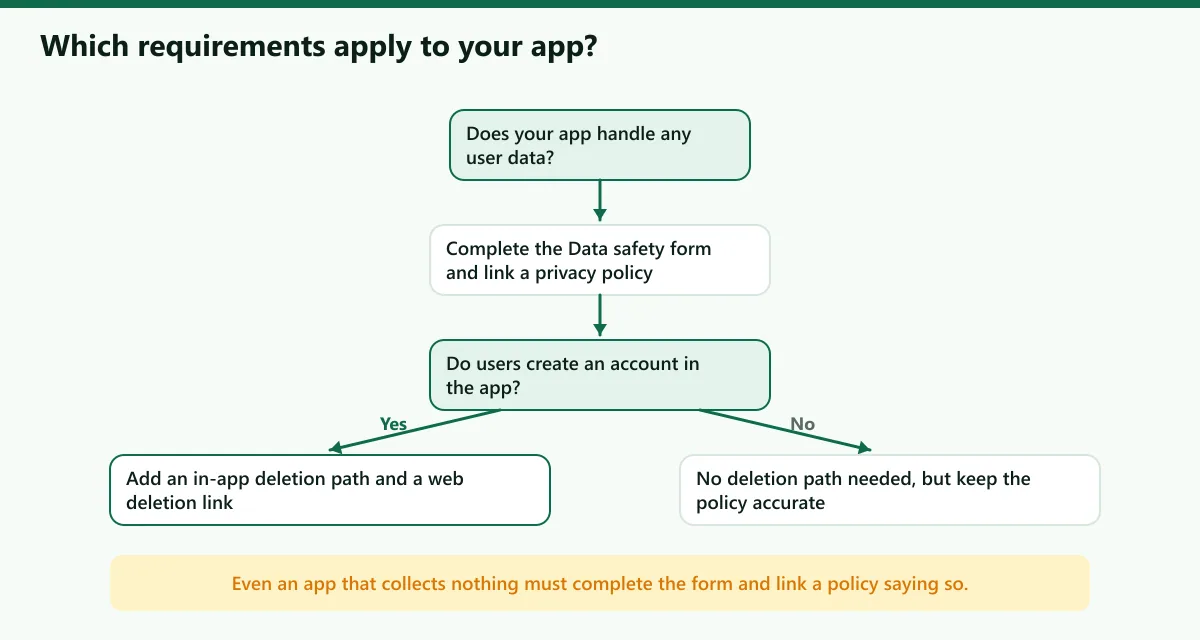
When do you need a privacy policy on Google Play?
Google's User Data policy asks you to be transparent about how your app handles personal and sensitive user data: what you collect, how you use it and who you share it with. In practice, you need a privacy policy whenever your app touches user data, and that includes data you might not think of as yours:
- Account details such as an email address or name.
- Device identifiers, analytics events and crash reports sent by SDKs.
- Advertising identifiers when you show ads.
- Camera, microphone, location, contacts, photos or health data.
- Purchase information from billing.
Even if your app collects nothing, Google states that you must still complete the Data safety form and provide a link to your privacy policy; the policy and the form can say that no user data is collected or shared.
What the privacy policy must include
Google says your policy must, together with any in-app disclosures, explain what user data your app collects and transmits, how it is used, and the type of parties it is shared with. Beyond that minimum, a clear policy covers:
- Who you are and how to contact you.
- What data you collect, listed by type.
- Why you collect it, one purpose per data type.
- Who receives it, naming third-party services and linking to their policies.
- How long you keep it and how users can delete it.
- Children, stating whether the app is directed at them.
- Users' rights and how you announce changes.
Three practical rules apply:
- The policy must be a real web page linked in your store listing. A prominent in-app disclosure, where one is required, cannot live only in a privacy policy or terms of service.
- It must also be accessible inside the app, for example from the settings screen.
- It must describe your app as it is today. Update it when you add an SDK or a permission.
Our privacy policy generator produces a structured draft and a matching deletion page from your answers. It is a template, not legal advice, so review it before you publish.
Prominent disclosure and consent
Some data needs more than a policy link. For personal and sensitive data, especially when its collection might not be expected by the user, such as background location, Google requires a prominent in-app disclosure before you ask for permission or consent. The disclosure has to say how the data is accessed, collected, used and shared, and the runtime permission request must come immediately after it.
Google lists violations that show the pattern: collecting device location without a prominent disclosure that explains the feature and any background use, and showing the runtime permission dialog before the disclosure. Use runtime permission requests where available, and transmit personal and sensitive data over HTTPS or other modern cryptography.
The Data safety form, field by field
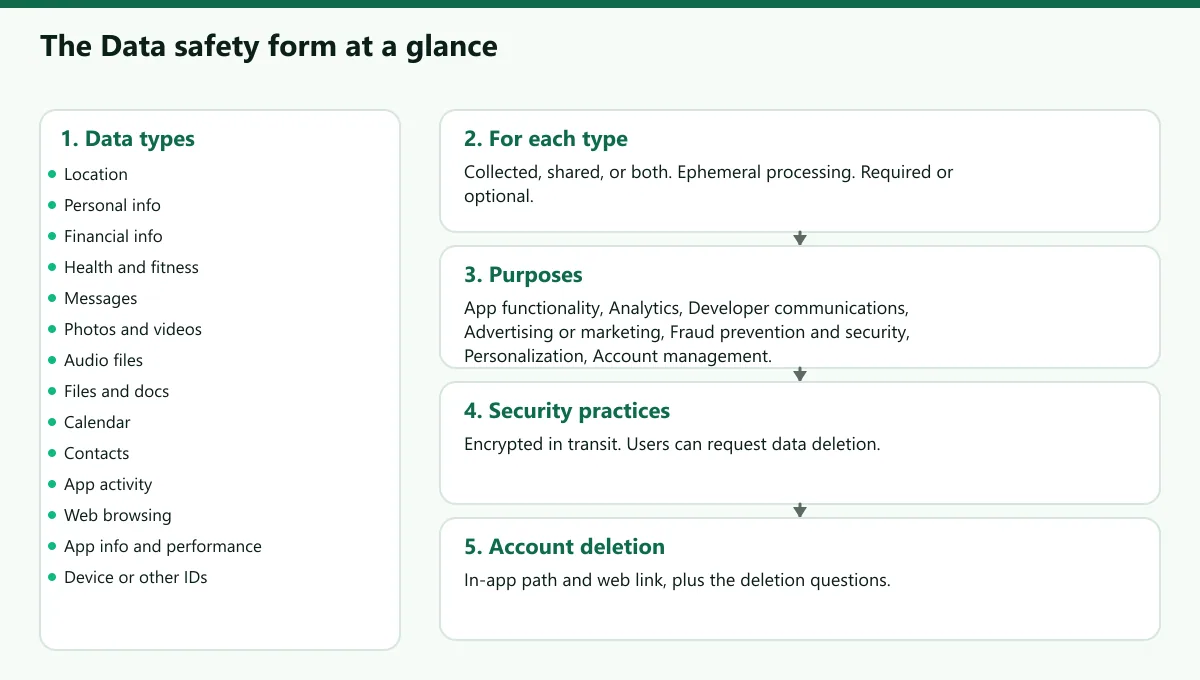
The Data safety form lives on the App content page in Play Console. Google reviews it as part of app review and shows the result on your store listing. You alone are responsible for its accuracy.
1. Does your app collect or share any required data types?
Google groups user data into types. The categories are Location, Personal info, Financial info, Health and fitness, Messages, Photos and videos, Audio files, Files and docs, Calendar, Contacts, App activity, Web browsing, App info and performance, and Device or other IDs. If your app collects or shares any of them you answer detailed questions for each.
2. Collected, shared, or both?
- Collection means your app transmits user data off the device. Data processed only on the device is not collected.
- Sharing means transferring the collected data to a third party. This includes server-to-server transfers, transfers to another app on the device, and data that your libraries and SDKs send directly to a third party.
- First party means the organisation that primarily processes the data, usually you as the publisher. Service providers that process data on your behalf are treated differently from third parties, so read Google's definitions before you decide.
Some uses do not have to be declared, such as data that is end-to-end encrypted and unreadable by you or any intermediary. Data used only in memory to serve a request and not stored can be treated as ephemeral, but data used to build profiles cannot.
3. Required or optional?
You can mark a data type as optional only if every user, in every region and on every device, can choose whether to provide it or opt in or out. A sign-in that is only needed for cloud backup, where the app works fully without it, is a typical optional example.
4. Why is the data collected?
For each type you choose the purposes: App functionality, Analytics, Developer communications, Advertising or marketing, Fraud prevention, security and compliance, Personalization, and Account management.
5. Security practices
You say whether data is encrypted in transit, and whether you provide a way for users to request that their data is deleted. You can also state that your app follows the Families Policy if it targets children, and you can optionally display an independent security review badge, which is a separate paid assessment by an authorised lab.
6. Third-party libraries and SDKs
Google is explicit that the form includes data collected or shared by third-party code in your app. Check each SDK's published data safety information, and remember that you remain responsible for the accuracy of the final answers.
Account and data deletion requirements
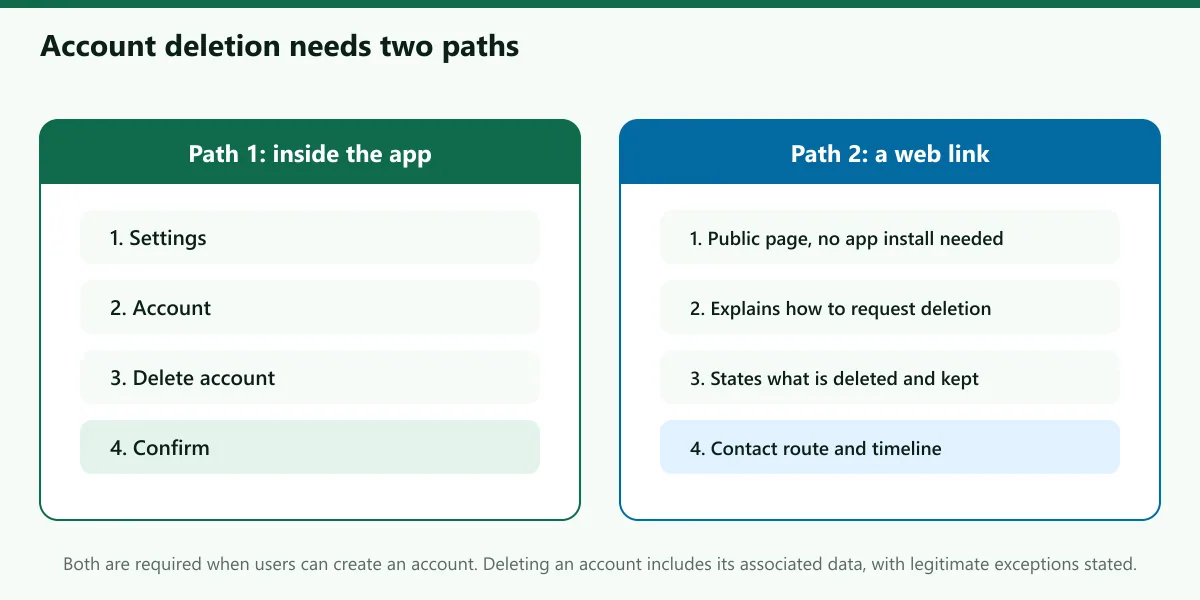
If your app lets users create an account from within the app, or sends them to an account creation flow outside the app, Google's policy requires you to:
- Provide an in-app path where users can request deletion of their account and associated data.
- Provide a web link resource where users can request deletion of the account and associated data, without needing to install the app.
- Answer the data deletion questions in the Data safety form, which feed the data deletion area on your store listing.
Points that trip teams up, all from Google's guidance:
- The requirement applies even if parts of your app work without an account.
- Deleting an account means deleting the user data associated with it. You may retain specific data for legitimate reasons such as security, fraud prevention or regulatory compliance, and you should say so.
- If you use service providers that process the data, delete it from your servers and request the provider to do the same.
- Complete requests within a reasonably quick period and tell users what to expect. Laws in some countries set specific rules.
See how this looks in practice on our own listings: the Traffic Quiz delete-account page and the Maya Yoga delete-account page both explain how to request deletion, and Maya adds a separate delete-data page for people who want data removed without closing the account.
Third-party SDK disclosures
Most apps share data through SDKs without realising it. The table lists SDKs we see often and the kind of disclosure to check. It is a starting point; always confirm against the SDK provider's own documentation.
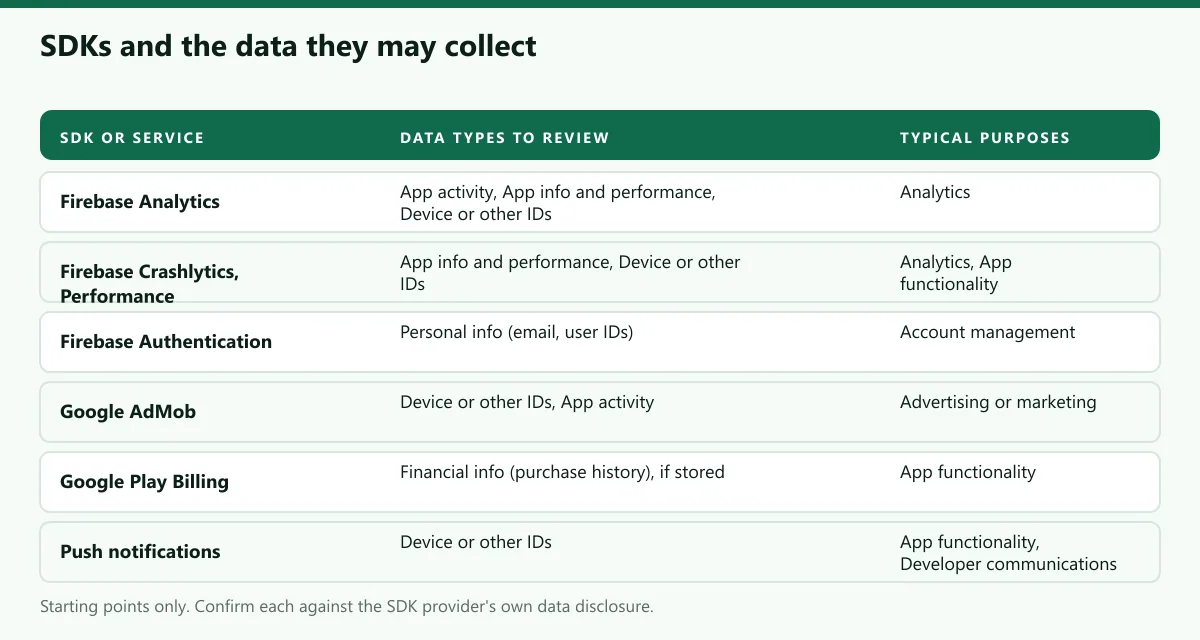
| SDK or service | Likely data types to review | Typical purposes |
|---|---|---|
| Firebase Analytics | App activity, App info and performance, Device or other IDs | Analytics |
| Firebase Crashlytics and Performance | App info and performance, Device or other IDs | Analytics, App functionality |
| Firebase Authentication | Personal info (email, user IDs) | Account management, App functionality |
| Google AdMob | Device or other IDs, App activity | Advertising or marketing |
| Google Play Billing | Financial info (purchase history), if you receive and store it | App functionality |
| Push notifications | Device or other IDs | App functionality, Developer communications |
Children's apps
If your app's target audience includes children, you must comply with Google Play's Families Policy, including using only Families Self-Certified Ads SDKs to serve ads to children and users of unknown age. You declare target age groups in the Target audience and content section, and you should select more than one age group only if the app is designed for and appropriate for every one of them. Google gives the example that an app designed for toddlers should select only "Ages 5 and under". Before you complete that section you must already have declared whether the app contains ads, provided app access instructions and added a privacy policy. If you follow the Families Policy you can display a badge in the Data safety section.
How we map a real policy to the form
Our own policies show the pattern. The Traffic Quiz privacy policy says the app can be used as a guest, that progress is stored on the device, that accounts add cloud sync, and that the free version shows Google AdMob ads. It lists the services that process data for us: Firebase (Authentication, Firestore, Storage, Analytics, Crashlytics, Performance Monitoring, Cloud Messaging and Remote Config), AdMob, Google Play Billing, Google Sign-In and Facebook Login. Each of those becomes a line to check in the form.
The Maya Yoga privacy policy goes further because the app has more sensitive features. It states that the camera form coach runs on the phone and that video is never recorded, saved or uploaded, which means camera data is processed on device. It explains exactly what the AI coach sends to the server, and what the server keeps. A sentence like that is what lets you answer the Data safety questions honestly.
The method we follow is simple:
- List every permission and SDK in the project, including transitive ones.
- Write the policy from that list, not from memory.
- Fill in the Data safety form from the policy, line by line.
- Open the app and test the claims. If the policy says nothing is uploaded, check the network traffic.
- Repeat after every release that adds a library or permission.
Common rejections and how to avoid them
- Form and policy disagree. The most common problem. Fix the source of truth, then update both.
- Policy only inside terms of service, or not reachable. Host a stand-alone public page and link it in both places.
- Location or other sensitive access with no prominent disclosure. Add the disclosure before the permission dialog.
- Account creation without a deletion path. Add both the in-app route and the web link.
- Children in the audience without Families compliance. Narrow the audience or comply.
- SDK data missing from the form. Check every SDK's data disclosure.
A practical checklist
- The privacy policy is a public web page, linked in the store listing and reachable inside the app.
- The policy lists the data collected, the purposes, the third parties, the retention period and a contact.
- The Data safety form was filled in from the policy and from the actual SDK list.
- Every sensitive permission is preceded by a prominent in-app disclosure.
- Data is transmitted over HTTPS.
- Account creation is matched by an in-app deletion path and a web deletion link.
- The data deletion questions in the form are complete.
- The target audience selection is accurate; the Families Policy is followed if children are included.
- The policy, the form and the app were re-checked after the latest release.
When you are ready to publish, follow our step-by-step Google Play publishing guide, and see the Android development service if you want a team to build and publish the app for you.
Frequently asked questions
Sources
- Google Play Console Help, User Data policy
- Google Play Console Help, Provide information for Google Play's Data safety section
- Google Play Console Help, Understanding Google Play's app account deletion requirements
- Google Play Console Help, Manage target audience and app content settings
- Google Play Console Help, Content rating requirements

Written by
Wazir Ahmed
Founder, DEESU and CEO, D.TEN
Dr. Wazir Ahmed founded DEESU and leads D.TEN, its training and education division. A training manager, educational psychologist and researcher with a Ph.D. in educational psychology, he works on learning systems, curriculum and training design.
More from WazirFree tools for this topic
Need help with this?